Redes Neuronales Recurrentes (RNNs)

S3: Unidades Recurrentes con Compuertas (GRU) y RNNs Bidireccionales

Prof. Francisco Suárez

Universidad Católica Boliviana

2026-03-18

Agenda de Hoy

Primera Parte

  1. 🔙 Repaso: LSTM y sus 3 compuertas
  2. 🔧 GRU: la alternativa simplificada
  3. 📐 Ecuaciones de la GRU paso a paso

Segunda Parte

  1. ↔︎️ RNNs Bidireccionales: mirando hacia adelante y atrás
  2. 🐍 GRU y BiLSTM en PyTorch
  3. 📊 Comparación práctica: LSTM vs. GRU vs. BiLSTM

Bloque 1: De LSTM a GRU

Repaso Rápido: LSTM

En la sesión anterior vimos que la LSTM resuelve el vanishing gradient con 3 compuertas y 2 estados:

Ecuaciones LSTM

\[f_t = \sigma(W_f [h_{t-1}, x_t] + b_f)\] \[i_t = \sigma(W_i [h_{t-1}, x_t] + b_i)\] \[\tilde{c}_t = \tanh(W_c [h_{t-1}, x_t] + b_c)\] \[c_t = f_t \odot c_{t-1} + i_t \odot \tilde{c}_t\] \[o_t = \sigma(W_o [h_{t-1}, x_t] + b_o)\] \[h_t = o_t \odot \tanh(c_t)\]

Inventario

Componente Cantidad
Compuertas 3 (\(f_t, i_t, o_t\))
Estados 2 (\(h_t, c_t\))
Matrices de peso 8 (\(W\) y \(b\) por compuerta + candidato)
Parámetros \(4 \times D_h(d + D_h + 1)\)

¿Podemos simplificar?

La LSTM funciona muy bien, pero tiene muchos parámetros. En 2014, Cho et al. propusieron una alternativa más eficiente: la GRU (Gated Recurrent Unit).

La Pregunta de Cho et al. (2014)

“¿Realmente necesitamos 3 compuertas y 2 estados separados? ¿Podemos lograr un desempeño comparable con menos?”

Las simplificaciones clave de la GRU

LSTM → GRU

  1. Fusionar \(c_t\) y \(h_t\) en un solo estado \(h_t\)
  2. Fusionar las compuertas de olvido (\(f_t\)) y entrada (\(i_t\)) en una sola: \(f_t = 1 - i_t\)
  3. Eliminar la compuerta de salida (\(o_t\))

Resultado

  • 2 compuertas en vez de 3
  • 1 estado en vez de 2
  • ~25% menos parámetros
  • Desempeño comparable en la mayoría de tareas
Code
graph LR
    subgraph "LSTM: 3 compuertas, 2 estados"
        l1["f_t (olvido)"] 
        l2["i_t (entrada)"]
        l3["o_t (salida)"]
        l4["h_t + c_t"]
    end
    subgraph "GRU: 2 compuertas, 1 estado"
        g1["z_t (actualización)"]
        g2["r_t (reset)"]
        g3["h_t"]
    end
    style l1 fill:#e76f51,color:#fff
    style l2 fill:#0077b6,color:#fff
    style l3 fill:#2a9d8f,color:#fff
    style l4 fill:#264653,color:#fff
    style g1 fill:#e76f51,color:#fff
    style g2 fill:#0077b6,color:#fff
    style g3 fill:#264653,color:#fff

graph LR
    subgraph "LSTM: 3 compuertas, 2 estados"
        l1["f_t (olvido)"] 
        l2["i_t (entrada)"]
        l3["o_t (salida)"]
        l4["h_t + c_t"]
    end
    subgraph "GRU: 2 compuertas, 1 estado"
        g1["z_t (actualización)"]
        g2["r_t (reset)"]
        g3["h_t"]
    end
    style l1 fill:#e76f51,color:#fff
    style l2 fill:#0077b6,color:#fff
    style l3 fill:#2a9d8f,color:#fff
    style l4 fill:#264653,color:#fff
    style g1 fill:#e76f51,color:#fff
    style g2 fill:#0077b6,color:#fff
    style g3 fill:#264653,color:#fff

Bloque 2: Anatomía de la GRU

Ecuaciones de la GRU

La GRU tiene 2 compuertas que controlan el flujo de información:

Compuertas

\[r_t = \sigma(W_r [h_{t-1}, x_t] + b_r) \quad \text{(reset)}\] \[z_t = \sigma(W_z [h_{t-1}, x_t] + b_z) \quad \text{(actualización)}\]

Candidato y estado

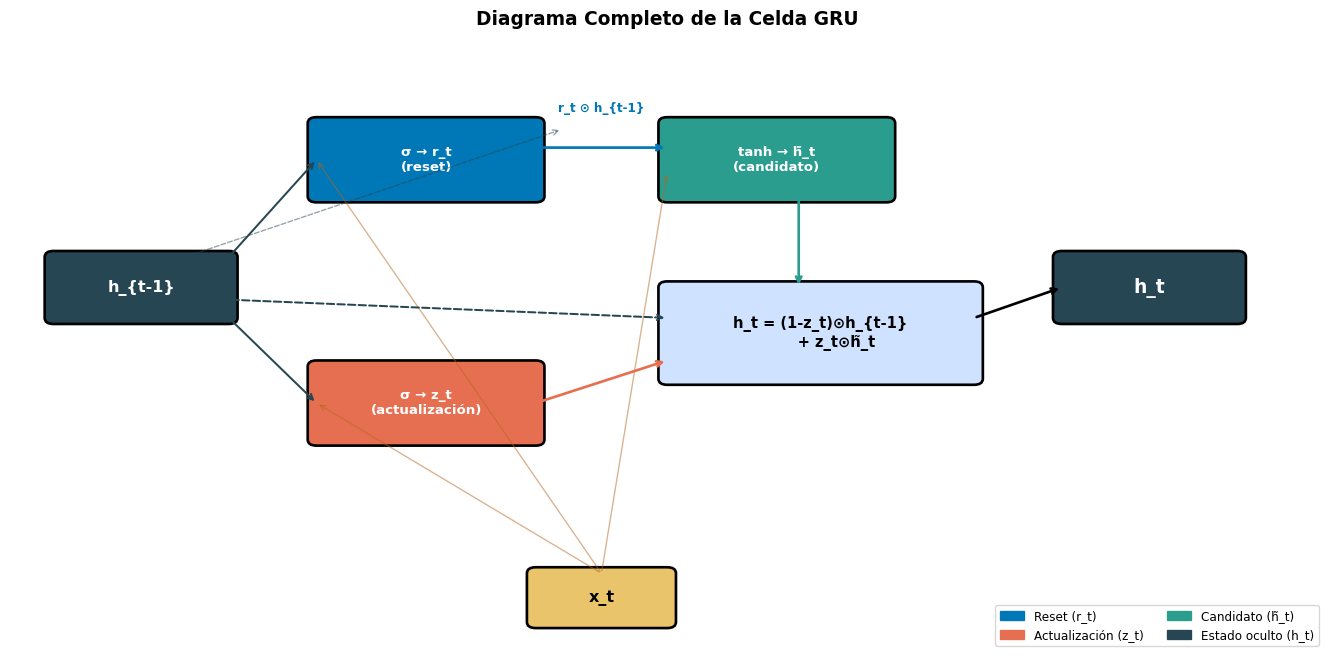
\[\tilde{h}_t = \tanh(W_h [r_t \odot h_{t-1}, x_t] + b_h)\] \[\boxed{h_t = (1 - z_t) \odot h_{t-1} + z_t \odot \tilde{h}_t}\]

¿Qué hace cada compuerta?

Compuerta Rol
\(r_t\) (reset) ¿Cuánto del estado previo usar para calcular el candidato?
\(z_t\) (actualización) ¿Cuánto del estado nuevo vs. viejo conservar?

La compuerta \(z_t\) es clave: combina las funciones de olvido (\(f_t\)) y entrada (\(i_t\)) de la LSTM en una sola.

La Restricción Elegante

Notemos que \((1-z_t) + z_t = 1\) siempre. Esto significa que el nuevo estado \(h_t\) es una interpolación entre el estado anterior y el candidato. No hay forma de “olvidar todo” y “no escribir nada” — la información siempre se conserva en algún grado.

Paso a Paso: La Compuerta de Reset (\(r_t\))

\[r_t = \sigma(W_r [h_{t-1}, x_t] + b_r)\]

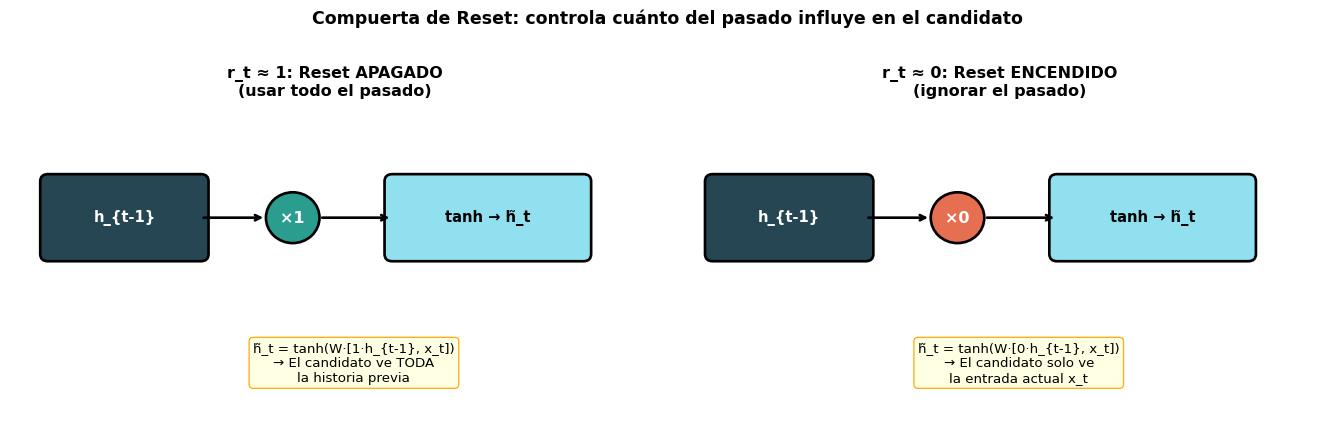
La compuerta de reset decide cuánto del pasado importa para calcular el candidato \(\tilde{h}_t\):

Code
import matplotlib.pyplot as plt
import matplotlib.patches as mpatches

fig, axes = plt.subplots(1, 2, figsize=(14, 4.5))

for ax, r_val, title, scenario in [
    (axes[0], 1.0, 'r_t ≈ 1: Reset APAGADO\n(usar todo el pasado)', 
     'h̃_t = tanh(W·[1·h_{t-1}, x_t])\n→ El candidato ve TODA\nla historia previa'),
    (axes[1], 0.0, 'r_t ≈ 0: Reset ENCENDIDO\n(ignorar el pasado)',
     'h̃_t = tanh(W·[0·h_{t-1}, x_t])\n→ El candidato solo ve\nla entrada actual x_t'),
]:
    ax.set_xlim(-0.5, 8)
    ax.set_ylim(-0.5, 4)
    ax.axis('off')
    
    # h_{t-1}
    rect = mpatches.FancyBboxPatch((0, 2.0), 2, 1, boxstyle="round,pad=0.1",
                                     facecolor='#264653', edgecolor='black', linewidth=2)
    ax.add_patch(rect)
    ax.text(1, 2.5, 'h_{t-1}', ha='center', va='center', fontsize=11, color='white', fontweight='bold')
    
    # × r_t
    color = '#2a9d8f' if r_val == 1.0 else '#e76f51'
    circle = plt.Circle((3.2, 2.5), 0.35, facecolor=color, edgecolor='black', linewidth=2)
    ax.add_patch(circle)
    ax.text(3.2, 2.5, f'×{r_val:.0f}', ha='center', va='center', fontsize=12, color='white', fontweight='bold')
    
    ax.annotate('', xy=(2.85, 2.5), xytext=(2, 2.5),
                arrowprops=dict(arrowstyle='->', color='black', lw=2))
    
    # Result → tanh
    rect2 = mpatches.FancyBboxPatch((4.5, 2.0), 2.5, 1, boxstyle="round,pad=0.1",
                                      facecolor='#90e0ef', edgecolor='black', linewidth=2)
    ax.add_patch(rect2)
    ax.text(5.75, 2.5, 'tanh → h̃_t', ha='center', va='center', fontsize=11, fontweight='bold')
    
    ax.annotate('', xy=(4.5, 2.5), xytext=(3.55, 2.5),
                arrowprops=dict(arrowstyle='->', color='black', lw=2))
    
    # Explanation
    ax.text(4, 0.5, scenario, ha='center', va='center', fontsize=10,
            bbox=dict(boxstyle='round', facecolor='lightyellow', edgecolor='orange', alpha=0.9))
    
    ax.set_title(title, fontsize=12, fontweight='bold', pad=10)

plt.suptitle('Compuerta de Reset: controla cuánto del pasado influye en el candidato',
             fontsize=13, fontweight='bold', y=1.02)
plt.tight_layout()
plt.show()
  • \(r_t \approx 1\): el candidato usa la memoria completa (comportamiento normal)
  • \(r_t \approx 0\): el candidato ignora la historia — permite “empezar de cero”

Paso a Paso: La Compuerta de Actualización (\(z_t\))

\[h_t = (1 - z_t) \odot h_{t-1} + z_t \odot \tilde{h}_t\]

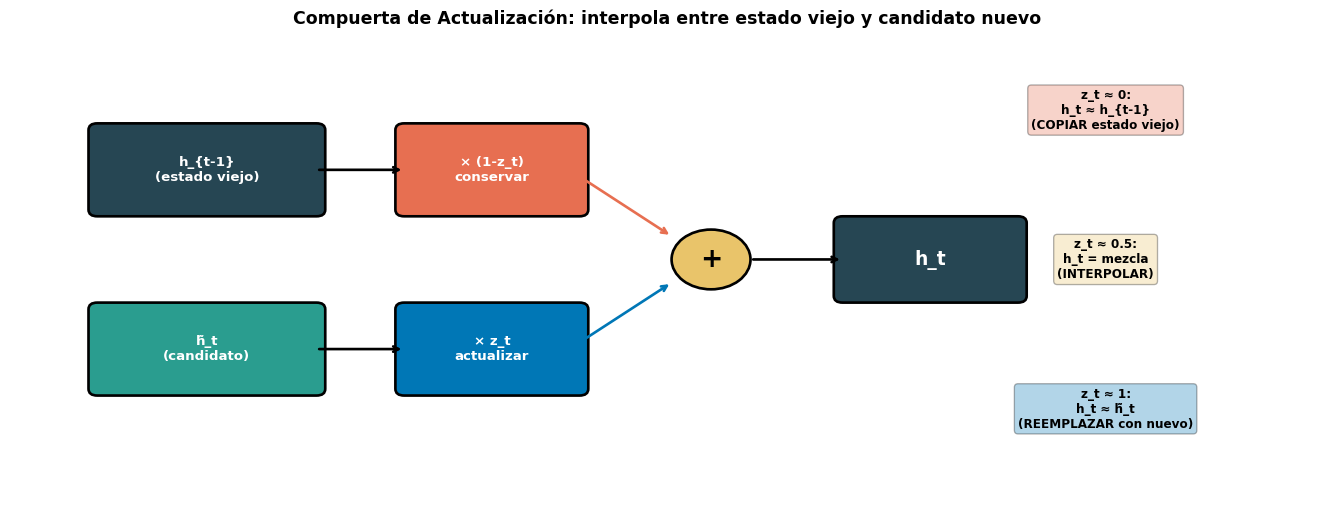
Esta es la ecuación más importante de la GRU. Es una interpolación lineal:

Code
import matplotlib.pyplot as plt
import matplotlib.patches as mpatches
import numpy as np

fig, ax = plt.subplots(figsize=(14, 5.5))
ax.set_xlim(-1, 14)
ax.set_ylim(-1, 6)
ax.axis('off')

# h_{t-1} (old)
rect = mpatches.FancyBboxPatch((0, 3.5), 2.5, 1.2, boxstyle="round,pad=0.1",
                                 facecolor='#264653', edgecolor='black', linewidth=2)
ax.add_patch(rect)
ax.text(1.25, 4.1, 'h_{t-1}\n(estado viejo)', ha='center', va='center', fontsize=10, color='white', fontweight='bold')

# × (1-z_t)
rect2 = mpatches.FancyBboxPatch((3.5, 3.5), 2, 1.2, boxstyle="round,pad=0.1",
                                  facecolor='#e76f51', edgecolor='black', linewidth=2)
ax.add_patch(rect2)
ax.text(4.5, 4.1, '× (1-z_t)\nconservar', ha='center', va='center', fontsize=10, color='white', fontweight='bold')

ax.annotate('', xy=(3.5, 4.1), xytext=(2.5, 4.1),
            arrowprops=dict(arrowstyle='->', color='black', lw=2))

# h_tilde (new)
rect3 = mpatches.FancyBboxPatch((0, 0.8), 2.5, 1.2, boxstyle="round,pad=0.1",
                                  facecolor='#2a9d8f', edgecolor='black', linewidth=2)
ax.add_patch(rect3)
ax.text(1.25, 1.4, 'h̃_t\n(candidato)', ha='center', va='center', fontsize=10, color='white', fontweight='bold')

# × z_t
rect4 = mpatches.FancyBboxPatch((3.5, 0.8), 2, 1.2, boxstyle="round,pad=0.1",
                                  facecolor='#0077b6', edgecolor='black', linewidth=2)
ax.add_patch(rect4)
ax.text(4.5, 1.4, '× z_t\nactualizar', ha='center', va='center', fontsize=10, color='white', fontweight='bold')

ax.annotate('', xy=(3.5, 1.4), xytext=(2.5, 1.4),
            arrowprops=dict(arrowstyle='->', color='black', lw=2))

# + (sum)
circle = plt.Circle((7, 2.75), 0.45, facecolor='#e9c46a', edgecolor='black', linewidth=2)
ax.add_patch(circle)
ax.text(7, 2.75, '+', ha='center', va='center', fontsize=20, fontweight='bold')

ax.annotate('', xy=(6.55, 3.1), xytext=(5.5, 4.0),
            arrowprops=dict(arrowstyle='->', color='#e76f51', lw=2))
ax.annotate('', xy=(6.55, 2.4), xytext=(5.5, 1.5),
            arrowprops=dict(arrowstyle='->', color='#0077b6', lw=2))

# h_t result
rect5 = mpatches.FancyBboxPatch((8.5, 2.2), 2, 1.1, boxstyle="round,pad=0.1",
                                  facecolor='#264653', edgecolor='black', linewidth=2)
ax.add_patch(rect5)
ax.text(9.5, 2.75, 'h_t', ha='center', va='center', fontsize=14, color='white', fontweight='bold')

ax.annotate('', xy=(8.5, 2.75), xytext=(7.45, 2.75),
            arrowprops=dict(arrowstyle='->', color='black', lw=2))

# Explanation
explanations = [
    (11.5, 5.0, 'z_t ≈ 0:\nh_t ≈ h_{t-1}\n(COPIAR estado viejo)', '#e76f51'),
    (11.5, 2.75, 'z_t ≈ 0.5:\nh_t = mezcla\n(INTERPOLAR)', '#e9c46a'),
    (11.5, 0.5, 'z_t ≈ 1:\nh_t ≈ h̃_t\n(REEMPLAZAR con nuevo)', '#0077b6'),
]
for x, y, text, color in explanations:
    ax.text(x, y, text, ha='center', va='center', fontsize=9,
            bbox=dict(boxstyle='round', facecolor=color, edgecolor='black', alpha=0.3),
            fontweight='bold')

ax.set_title('Compuerta de Actualización: interpola entre estado viejo y candidato nuevo',
             fontsize=13, fontweight='bold', pad=15)
plt.tight_layout()
plt.show()

¿Por Qué Esto También Resuelve el Vanishing Gradient?

Cuando \(z_t \approx 0\), tenemos \(h_t \approx h_{t-1}\) — el gradiente pasa directo sin modificarse, igual que la “autopista” \(c_t\) de la LSTM. La GRU logra el mismo efecto con un mecanismo más simple.

Diagrama Completo de la Celda GRU

Code
import matplotlib.pyplot as plt
import matplotlib.patches as mpatches

fig, ax = plt.subplots(figsize=(14, 7))
ax.set_xlim(-1, 14)
ax.set_ylim(-2, 8)
ax.axis('off')

c_reset = '#0077b6'
c_update = '#e76f51'
c_cand = '#2a9d8f'
c_hidden = '#264653'

# === h_{t-1} input ===
rect = mpatches.FancyBboxPatch((-0.5, 3.5), 2, 1, boxstyle="round,pad=0.1",
                                 facecolor=c_hidden, edgecolor='black', linewidth=2)
ax.add_patch(rect)
ax.text(0.5, 4.0, 'h_{t-1}', ha='center', va='center', fontsize=12, color='white', fontweight='bold')

# === x_t input ===
rect = mpatches.FancyBboxPatch((5, -1.5), 1.5, 0.8, boxstyle="round,pad=0.1",
                                 facecolor='#e9c46a', edgecolor='black', linewidth=2)
ax.add_patch(rect)
ax.text(5.75, -1.1, 'x_t', ha='center', va='center', fontsize=12, fontweight='bold')

# === Reset gate (r_t) ===
rect = mpatches.FancyBboxPatch((2.5, 5.5), 2.5, 1.2, boxstyle="round,pad=0.1",
                                 facecolor=c_reset, edgecolor='black', linewidth=2)
ax.add_patch(rect)
ax.text(3.75, 6.1, 'σ → r_t\n(reset)', ha='center', va='center', fontsize=10, color='white', fontweight='bold')

# === Update gate (z_t) ===
rect = mpatches.FancyBboxPatch((2.5, 1.5), 2.5, 1.2, boxstyle="round,pad=0.1",
                                 facecolor=c_update, edgecolor='black', linewidth=2)
ax.add_patch(rect)
ax.text(3.75, 2.1, 'σ → z_t\n(actualización)', ha='center', va='center', fontsize=10, color='white', fontweight='bold')

# === Candidate (h_tilde) ===
rect = mpatches.FancyBboxPatch((6.5, 5.5), 2.5, 1.2, boxstyle="round,pad=0.1",
                                 facecolor=c_cand, edgecolor='black', linewidth=2)
ax.add_patch(rect)
ax.text(7.75, 6.1, 'tanh → h̃_t\n(candidato)', ha='center', va='center', fontsize=10, color='white', fontweight='bold')

# === Interpolation ===
rect = mpatches.FancyBboxPatch((6.5, 2.5), 3.5, 1.5, boxstyle="round,pad=0.1",
                                 facecolor='#cfe2ff', edgecolor='black', linewidth=2)
ax.add_patch(rect)
ax.text(8.25, 3.25, 'h_t = (1-z_t)⊙h_{t-1}\n      + z_t⊙h̃_t', ha='center', va='center', fontsize=11, fontweight='bold')

# === h_t output ===
rect = mpatches.FancyBboxPatch((11, 3.5), 2, 1, boxstyle="round,pad=0.1",
                                 facecolor=c_hidden, edgecolor='black', linewidth=2)
ax.add_patch(rect)
ax.text(12, 4.0, 'h_t', ha='center', va='center', fontsize=14, color='white', fontweight='bold')

# === Arrows ===
# h_{t-1} → reset, update gates
ax.annotate('', xy=(2.5, 6.1), xytext=(1.5, 4.5),
            arrowprops=dict(arrowstyle='->', color=c_hidden, lw=1.5))
ax.annotate('', xy=(2.5, 2.1), xytext=(1.5, 3.5),
            arrowprops=dict(arrowstyle='->', color=c_hidden, lw=1.5))

# x_t → reset, update, candidate
for ty in [6.1, 2.1]:
    ax.annotate('', xy=(2.5, ty), xytext=(5.75, -0.7),
                arrowprops=dict(arrowstyle='->', color='#b5651d', lw=1, alpha=0.5))
ax.annotate('', xy=(6.5, 5.9), xytext=(5.75, -0.7),
            arrowprops=dict(arrowstyle='->', color='#b5651d', lw=1, alpha=0.5))

# r_t → candidate (through multiplication with h_{t-1})
ax.annotate('', xy=(6.5, 6.3), xytext=(5, 6.3),
            arrowprops=dict(arrowstyle='->', color=c_reset, lw=2))
ax.text(5.75, 6.9, 'r_t ⊙ h_{t-1}', fontsize=9, ha='center', color=c_reset, fontweight='bold')

# h_{t-1} → candidate (via reset)
ax.annotate('', xy=(5.3, 6.6), xytext=(1, 4.5),
            arrowprops=dict(arrowstyle='->', color=c_hidden, lw=1, linestyle='dashed', alpha=0.5))

# z_t → interpolation
ax.annotate('', xy=(6.5, 2.8), xytext=(5, 2.1),
            arrowprops=dict(arrowstyle='->', color=c_update, lw=2))

# h_tilde → interpolation
ax.annotate('', xy=(8, 4.0), xytext=(8, 5.5),
            arrowprops=dict(arrowstyle='->', color=c_cand, lw=2))

# h_{t-1} → interpolation
ax.annotate('', xy=(6.5, 3.5), xytext=(1.5, 3.8),
            arrowprops=dict(arrowstyle='->', color=c_hidden, lw=1.5, linestyle='dashed'))

# interpolation → h_t
ax.annotate('', xy=(11, 4.0), xytext=(10, 3.5),
            arrowprops=dict(arrowstyle='->', color='black', lw=2))

ax.set_title('Diagrama Completo de la Celda GRU', fontsize=14, fontweight='bold', pad=15)

legend_items = [
    mpatches.Patch(color=c_reset, label='Reset (r_t)'),
    mpatches.Patch(color=c_update, label='Actualización (z_t)'),
    mpatches.Patch(color=c_cand, label='Candidato (h̃_t)'),
    mpatches.Patch(color=c_hidden, label='Estado oculto (h_t)'),
]
ax.legend(handles=legend_items, loc='lower right', fontsize=9, ncol=2)

plt.tight_layout()
plt.show()

GRU vs. LSTM: Lado a Lado

Aspecto LSTM GRU
Compuertas 3 (\(f_t, i_t, o_t\)) 2 (\(r_t, z_t\))
Estados 2 (\(h_t, c_t\)) 1 (\(h_t\))
Olvido + Entrada Independientes: \(f_t\) y \(i_t\) Acoplados: \((1-z_t)\) y \(z_t\)
Control de salida \(o_t\) filtra \(c_t\) Expone \(h_t\) completo
Parámetros \(4 \times D_h(d + D_h + 1)\) \(3 \times D_h(d + D_h + 1)\)
Velocidad Más lento ~20-30% más rápido
Rendimiento Generalmente equivalente Generalmente equivalente
import torch.nn as nn

d, Dh = 100, 128
lstm = nn.LSTM(d, Dh, batch_first=True)
gru = nn.GRU(d, Dh, batch_first=True)

lstm_p = sum(p.numel() for p in lstm.parameters())
gru_p = sum(p.numel() for p in gru.parameters())
print(f"LSTM parámetros: {lstm_p:>8,}")
print(f"GRU  parámetros: {gru_p:>8,}")
print(f"Ratio GRU/LSTM:  {gru_p/lstm_p:.2f}x  ({(1-gru_p/lstm_p)*100:.0f}% menos)")
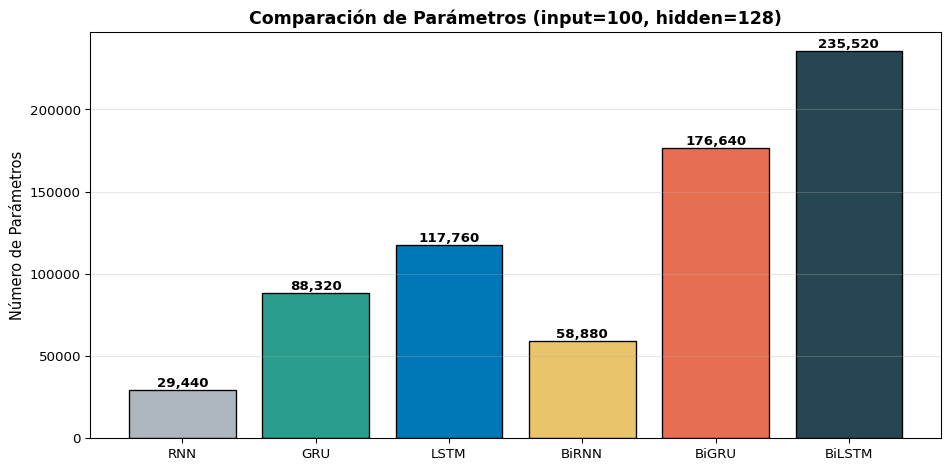
LSTM parámetros:  117,760
GRU  parámetros:   88,320
Ratio GRU/LSTM:  0.75x  (25% menos)

¿Cuándo Usar GRU vs. LSTM?

Prefiere GRU cuando…

  • El dataset es pequeño (menos parámetros = menos overfitting)
  • Necesitas velocidad de entrenamiento
  • Las secuencias son cortas a medianas
  • Estás haciendo prototipado rápido
  • Los recursos computacionales son limitados

Prefiere LSTM cuando…

  • El dataset es grande (más parámetros aprovechados)
  • Las secuencias son muy largas (>200 tokens)
  • Necesitas control fino sobre la memoria (compuertas independientes)
  • La tarea requiere modelado preciso de dependencias
  • Es tu modelo de producción final

En la Práctica

Muchos investigadores prueban ambos y eligen el que funcione mejor para su tarea específica. No hay un ganador universal. Chung et al. (2014) encontraron que ambos superan consistentemente a la RNN simple, pero ninguno domina al otro.

Bloque 3: GRU en PyTorch

nn.GRU Paso a Paso

import torch
import torch.nn as nn

# Definir GRU — ¡misma interfaz que nn.RNN!
gru = nn.GRU(
    input_size=64,      # dimensión de entrada
    hidden_size=128,    # dimensión del estado oculto
    num_layers=1,
    batch_first=True
)

x = torch.randn(3, 10, 64)  # (batch=3, seq_len=10, input=64)

# Forward pass — igual que nn.RNN (NO devuelve c_n como LSTM)
output, h_n = gru(x)

print(f"Entrada:  {x.shape}         →  (batch, seq_len, input)")
print(f"Salida:   {output.shape}   →  (batch, seq_len, hidden)")
print(f"h_n:      {h_n.shape}       →  (layers, batch, hidden)")
print(f"\n¿output[:,-1,:] == h_n[0]?  {torch.allclose(output[:, -1, :], h_n[0])}")
Entrada:  torch.Size([3, 10, 64])         →  (batch, seq_len, input)
Salida:   torch.Size([3, 10, 128])   →  (batch, seq_len, hidden)
h_n:      torch.Size([1, 3, 128])       →  (layers, batch, hidden)

¿output[:,-1,:] == h_n[0]?  True

Interfaz Idéntica a nn.RNN

A diferencia de nn.LSTM que devuelve (output, (h_n, c_n)), la GRU devuelve (output, h_n) — exactamente como nn.RNN. Cambiar de RNN a GRU es literalmente reemplazar nn.RNN por nn.GRU.

Clasificador con GRU

import torch
import torch.nn as nn

class GRUClassifier(nn.Module):
    """Clasificador Many-to-One con GRU."""
    def __init__(self, vocab_size, embed_dim, hidden_dim, n_classes, padding_idx=0):
        super().__init__()
        self.embedding = nn.Embedding(vocab_size, embed_dim, padding_idx=padding_idx)
        self.gru = nn.GRU(embed_dim, hidden_dim, batch_first=True)
        self.fc = nn.Linear(hidden_dim, n_classes)
        self.dropout = nn.Dropout(0.3)

    def forward(self, x):
        emb = self.embedding(x)              # (batch, seq_len, embed_dim)
        output, h_n = self.gru(emb)          # h_n: (1, batch, hidden)
        h_last = h_n.squeeze(0)              # (batch, hidden)
        h_last = self.dropout(h_last)
        logits = self.fc(h_last)             # (batch, n_classes)
        return logits

model_gru = GRUClassifier(vocab_size=10000, embed_dim=100, hidden_dim=128, n_classes=2)
print(model_gru)
print(f"\nParámetros: {sum(p.numel() for p in model_gru.parameters()):,}")
GRUClassifier(
  (embedding): Embedding(10000, 100, padding_idx=0)
  (gru): GRU(100, 128, batch_first=True)
  (fc): Linear(in_features=128, out_features=2, bias=True)
  (dropout): Dropout(p=0.3, inplace=False)
)

Parámetros: 1,088,578

Bloque 4: RNNs Bidireccionales

El Problema: Solo Miramos Hacia Atrás

Hasta ahora, nuestras RNNs procesan la secuencia de izquierda a derecha:

Code
graph LR
    x1["El"] --> r1["→ RNN"]
    x2["gato"] --> r2["→ RNN"]
    x3["come"] --> r3["→ RNN"]
    x4["pescado"] --> r4["→ RNN"]
    r1 -->|"h₁"| r2
    r2 -->|"h₂"| r3
    r3 -->|"h₃"| r4
    style r1 fill:#2a9d8f,color:#fff
    style r2 fill:#2a9d8f,color:#fff
    style r3 fill:#2a9d8f,color:#fff
    style r4 fill:#2a9d8f,color:#fff

graph LR
    x1["El"] --> r1["→ RNN"]
    x2["gato"] --> r2["→ RNN"]
    x3["come"] --> r3["→ RNN"]
    x4["pescado"] --> r4["→ RNN"]
    r1 -->|"h₁"| r2
    r2 -->|"h₂"| r3
    r3 -->|"h₃"| r4
    style r1 fill:#2a9d8f,color:#fff
    style r2 fill:#2a9d8f,color:#fff
    style r3 fill:#2a9d8f,color:#fff
    style r4 fill:#2a9d8f,color:#fff

Al procesar “come”, \(h_3\) sabe que antes vinieron “El gato”, pero no sabe qué viene después (“pescado”).

¿Por qué esto es un problema?

Consideren el etiquetado POS de “banco”:

  • “Fui al banco a depositar dinero” → NOUN (institución financiera)
  • “Me senté en el banco del parque” → NOUN (asiento)

Para desambiguar “banco”, necesitamos ver tanto lo que viene antes como lo que viene después. Una RNN unidireccional solo ve el contexto izquierdo.

La Solución: Procesar en Ambas Direcciones

Una RNN Bidireccional (BiRNN) usa dos RNNs independientes:

Code
graph LR
    subgraph "Forward →"
        x1f["El"] --> rf1["→"]
        x2f["gato"] --> rf2["→"]
        x3f["come"] --> rf3["→"]
        x4f["pescado"] --> rf4["→"]
        rf1 -->|"h→₁"| rf2
        rf2 -->|"h→₂"| rf3
        rf3 -->|"h→₃"| rf4
    end
    subgraph "Backward ←"
        x1b["El"] --> rb1["←"]
        x2b["gato"] --> rb2["←"]
        x3b["come"] --> rb3["←"]
        x4b["pescado"] --> rb4["←"]
        rb4 -->|"h←₄"| rb3
        rb3 -->|"h←₃"| rb2
        rb2 -->|"h←₂"| rb1
    end
    style rf1 fill:#2a9d8f,color:#fff
    style rf2 fill:#2a9d8f,color:#fff
    style rf3 fill:#2a9d8f,color:#fff
    style rf4 fill:#2a9d8f,color:#fff
    style rb1 fill:#e76f51,color:#fff
    style rb2 fill:#e76f51,color:#fff
    style rb3 fill:#e76f51,color:#fff
    style rb4 fill:#e76f51,color:#fff

graph LR
    subgraph "Forward →"
        x1f["El"] --> rf1["→"]
        x2f["gato"] --> rf2["→"]
        x3f["come"] --> rf3["→"]
        x4f["pescado"] --> rf4["→"]
        rf1 -->|"h→₁"| rf2
        rf2 -->|"h→₂"| rf3
        rf3 -->|"h→₃"| rf4
    end
    subgraph "Backward ←"
        x1b["El"] --> rb1["←"]
        x2b["gato"] --> rb2["←"]
        x3b["come"] --> rb3["←"]
        x4b["pescado"] --> rb4["←"]
        rb4 -->|"h←₄"| rb3
        rb3 -->|"h←₃"| rb2
        rb2 -->|"h←₂"| rb1
    end
    style rf1 fill:#2a9d8f,color:#fff
    style rf2 fill:#2a9d8f,color:#fff
    style rf3 fill:#2a9d8f,color:#fff
    style rf4 fill:#2a9d8f,color:#fff
    style rb1 fill:#e76f51,color:#fff
    style rb2 fill:#e76f51,color:#fff
    style rb3 fill:#e76f51,color:#fff
    style rb4 fill:#e76f51,color:#fff

La salida para cada posición \(t\) es la concatenación de ambas direcciones:

\[h_t = [\overrightarrow{h_t} ; \overleftarrow{h_t}] \in \mathbb{R}^{2D_h}\]

Ecuaciones de la BiRNN

Forward (izquierda → derecha)

\[\overrightarrow{h_t} = f(\overrightarrow{h_{t-1}}, x_t; \overrightarrow{W})\]

Procesa: \(x_1, x_2, \ldots, x_T\)

\(\overrightarrow{h_t}\) contiene contexto de los tokens \(x_1, \ldots, x_t\) (pasado)

Backward (derecha → izquierda)

\[\overleftarrow{h_t} = f(\overleftarrow{h_{t+1}}, x_t; \overleftarrow{W})\]

Procesa: \(x_T, x_{T-1}, \ldots, x_1\)

\(\overleftarrow{h_t}\) contiene contexto de los tokens \(x_t, \ldots, x_T\) (futuro)

Salida combinada

\[h_t = [\overrightarrow{h_t} ; \overleftarrow{h_t}] \in \mathbb{R}^{2D_h}\]

Dos Conjuntos de Pesos Independientes

La RNN forward y la backward tienen sus propios pesos. No comparten parámetros. Por lo tanto, una BiRNN tiene el doble de parámetros que una RNN unidireccional.

¿Cuándo Usar (y No Usar) BiRNNs?

✅ Sí usar BiRNN

  • Etiquetado POS (cada token necesita contexto completo)
  • NER (reconocimiento de entidades)
  • Clasificación de texto (leer todo el documento)
  • Question Answering (el contexto es fijo)
  • Cualquier tarea donde toda la secuencia está disponible de antemano

❌ No usar BiRNN

  • Generación de texto (no hemos visto los tokens futuros)
  • Modelos de lenguaje izquierda→derecha
  • Traducción en tiempo real (no sabemos el final de la oración)
  • Cualquier tarea autogregresiva donde la salida se genera token a token

Regla General

Si tu tarea tiene acceso a toda la secuencia de entrada antes de producir la salida, usa BiRNN. Si necesitas generar la salida token a token, usa RNN unidireccional.

Bloque 5: BiRNN en PyTorch

bidirectional=True

PyTorch hace trivial el uso de BiRNNs — solo un argumento extra:

import torch
import torch.nn as nn

# BiLSTM = LSTM Bidireccional
bilstm = nn.LSTM(
    input_size=64,
    hidden_size=128,
    num_layers=1,
    batch_first=True,
    bidirectional=True   # ← ¡Solo esto cambia!
)

x = torch.randn(3, 10, 64)  # (batch=3, seq_len=10, input=64)
output, (h_n, c_n) = bilstm(x)

print(f"Entrada:  {x.shape}          →  (batch, seq_len, input)")
print(f"Salida:   {output.shape}   →  (batch, seq_len, 2×hidden)")
print(f"h_n:      {h_n.shape}       →  (2×layers, batch, hidden)")
print(f"c_n:      {c_n.shape}       →  (2×layers, batch, hidden)")
Entrada:  torch.Size([3, 10, 64])          →  (batch, seq_len, input)
Salida:   torch.Size([3, 10, 256])   →  (batch, seq_len, 2×hidden)
h_n:      torch.Size([2, 3, 128])       →  (2×layers, batch, hidden)
c_n:      torch.Size([2, 3, 128])       →  (2×layers, batch, hidden)

¡Atención a las Dimensiones!

La salida ahora tiene dimensión 2 × hidden_size porque concatena ambas direcciones. El h_n tiene forma (2, batch, hidden) — el índice 0 es forward, el índice 1 es backward.

Extraer el Estado Final de una BiRNN

Para clasificación (many-to-one), necesitamos combinar los estados finales de ambas direcciones:

import torch
import torch.nn as nn

bilstm = nn.LSTM(64, 128, batch_first=True, bidirectional=True)
x = torch.randn(3, 10, 64)
output, (h_n, c_n) = bilstm(x)

# h_n[0] = último estado de la dirección FORWARD 
# h_n[1] = último estado de la dirección BACKWARD
h_forward = h_n[0]   # (batch, hidden)  — procesó x_1 ... x_T
h_backward = h_n[1]  # (batch, hidden)  — procesó x_T ... x_1

# Opción 1: Concatenar (más común)
h_cat = torch.cat([h_forward, h_backward], dim=1)  # (batch, 2×hidden)
print(f"Concatenado: {h_cat.shape}")

# Opción 2: Sumar
h_sum = h_forward + h_backward  # (batch, hidden)
print(f"Sumado:      {h_sum.shape}")

# Para la capa lineal final:
fc_cat = nn.Linear(2 * 128, 2)  # si concatenamos
fc_sum = nn.Linear(128, 2)      # si sumamos
Concatenado: torch.Size([3, 256])
Sumado:      torch.Size([3, 128])

Clasificador BiLSTM Completo

import torch
import torch.nn as nn

class BiLSTMClassifier(nn.Module):
    """Clasificador con LSTM Bidireccional."""
    def __init__(self, vocab_size, embed_dim, hidden_dim, n_classes, padding_idx=0):
        super().__init__()
        self.embedding = nn.Embedding(vocab_size, embed_dim, padding_idx=padding_idx)
        self.lstm = nn.LSTM(embed_dim, hidden_dim, batch_first=True, bidirectional=True)
        self.fc = nn.Linear(hidden_dim * 2, n_classes)  # 2× por bidireccional
        self.dropout = nn.Dropout(0.3)

    def forward(self, x):
        emb = self.embedding(x)                    # (batch, seq_len, embed_dim)
        output, (h_n, c_n) = self.lstm(emb)        # h_n: (2, batch, hidden)
        # Concatenar forward y backward
        h_cat = torch.cat([h_n[0], h_n[1]], dim=1) # (batch, 2×hidden)
        h_cat = self.dropout(h_cat)
        logits = self.fc(h_cat)                     # (batch, n_classes)
        return logits

model_bilstm = BiLSTMClassifier(vocab_size=10000, embed_dim=100, hidden_dim=128, n_classes=2)
print(model_bilstm)
print(f"\nParámetros: {sum(p.numel() for p in model_bilstm.parameters()):,}")
BiLSTMClassifier(
  (embedding): Embedding(10000, 100, padding_idx=0)
  (lstm): LSTM(100, 128, batch_first=True, bidirectional=True)
  (fc): Linear(in_features=256, out_features=2, bias=True)
  (dropout): Dropout(p=0.3, inplace=False)
)

Parámetros: 1,236,034

También: BiGRU

Funciona exactamente igual con GRU:

class BiGRUClassifier(nn.Module):
    """Clasificador con GRU Bidireccional."""
    def __init__(self, vocab_size, embed_dim, hidden_dim, n_classes, padding_idx=0):
        super().__init__()
        self.embedding = nn.Embedding(vocab_size, embed_dim, padding_idx=padding_idx)
        self.gru = nn.GRU(embed_dim, hidden_dim, batch_first=True, bidirectional=True)
        self.fc = nn.Linear(hidden_dim * 2, n_classes)
        self.dropout = nn.Dropout(0.3)

    def forward(self, x):
        emb = self.embedding(x)
        output, h_n = self.gru(emb)                 # h_n: (2, batch, hidden)
        h_cat = torch.cat([h_n[0], h_n[1]], dim=1)  # (batch, 2×hidden)
        h_cat = self.dropout(h_cat)
        return self.fc(h_cat)

model_bigru = BiGRUClassifier(vocab_size=10000, embed_dim=100, hidden_dim=128, n_classes=2)
print(f"BiGRU parámetros: {sum(p.numel() for p in model_bigru.parameters()):,}")
BiGRU parámetros: 1,177,154

Bloque 6: Comparación Práctica

Parámetros: Todas las Variantes

Code
import torch.nn as nn
import matplotlib.pyplot as plt
import numpy as np

d, Dh = 100, 128
models = {
    'RNN': nn.RNN(d, Dh, batch_first=True),
    'GRU': nn.GRU(d, Dh, batch_first=True),
    'LSTM': nn.LSTM(d, Dh, batch_first=True),
    'BiRNN': nn.RNN(d, Dh, batch_first=True, bidirectional=True),
    'BiGRU': nn.GRU(d, Dh, batch_first=True, bidirectional=True),
    'BiLSTM': nn.LSTM(d, Dh, batch_first=True, bidirectional=True),
}

names = list(models.keys())
params = [sum(p.numel() for p in m.parameters()) for m in models.values()]

fig, ax = plt.subplots(figsize=(10, 5))
colors = ['#adb5bd', '#2a9d8f', '#0077b6', '#e9c46a', '#e76f51', '#264653']
bars = ax.bar(names, params, color=colors, edgecolor='black', linewidth=1)

for bar, p in zip(bars, params):
    ax.text(bar.get_x() + bar.get_width()/2., bar.get_height() + 2000,
            f'{p:,}', ha='center', fontsize=10, fontweight='bold')

ax.set_ylabel('Número de Parámetros', fontsize=11)
ax.set_title(f'Comparación de Parámetros (input={d}, hidden={Dh})',
             fontsize=13, fontweight='bold')
ax.grid(True, alpha=0.3, axis='y')
plt.tight_layout()
plt.show()

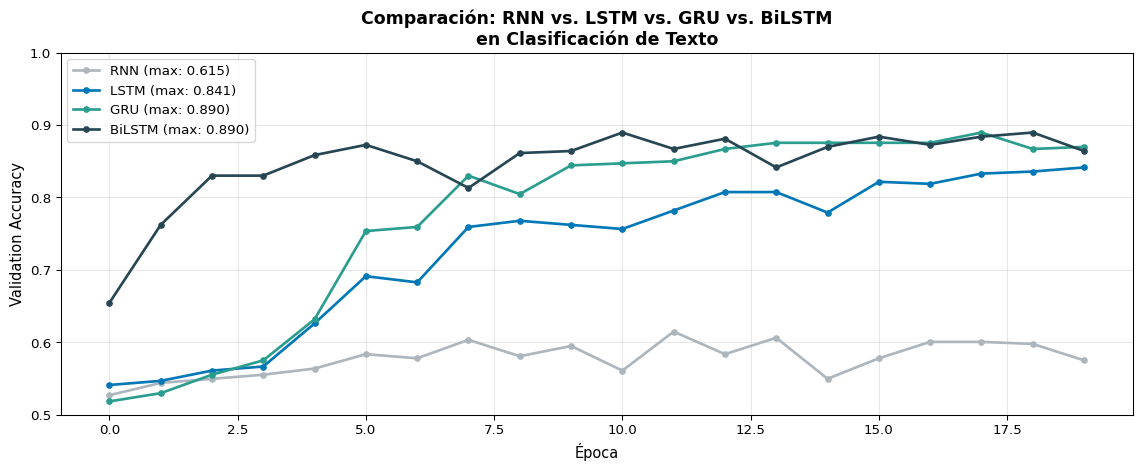
Experimento: Clasificación de Texto

Comparemos las 4 variantes principales en la misma tarea:

Code
import torch
import torch.nn as nn
import numpy as np
from sklearn.datasets import fetch_20newsgroups
from sklearn.model_selection import train_test_split
from collections import Counter
import matplotlib.pyplot as plt

# ---------- Datos ----------
categories = ['sci.space', 'talk.politics.misc']
data = fetch_20newsgroups(subset='all', categories=categories, remove=('headers', 'footers'))
texts, labels = data.data, data.target

def simple_tokenize(text, max_len=100):
    return text.lower().split()[:max_len]

all_tokens = [t for text in texts for t in simple_tokenize(text)]
word_counts = Counter(all_tokens)
vocab_list = ['<pad>', '<unk>'] + [w for w, c in word_counts.most_common(5000)]
word2idx = {w: i for i, w in enumerate(vocab_list)}

def encode(text, max_len=100):
    tokens = simple_tokenize(text, max_len)
    ids = [word2idx.get(t, 1) for t in tokens]
    ids += [0] * (max_len - len(ids))
    return ids

X = torch.tensor([encode(t) for t in texts])
y = torch.tensor(labels)
X_train, X_val, y_train, y_val = train_test_split(X, y, test_size=0.2, random_state=42)
train_ds = torch.utils.data.TensorDataset(X_train, y_train)
train_loader = torch.utils.data.DataLoader(train_ds, batch_size=32, shuffle=True)

# ---------- Modelo genérico ----------
class TextClassifier(nn.Module):
    def __init__(self, vocab_size, embed_dim, hidden_dim, n_classes, rnn_type='LSTM', bidirectional=False):
        super().__init__()
        self.embedding = nn.Embedding(vocab_size, embed_dim, padding_idx=0)
        self.bidirectional = bidirectional
        self.rnn_type = rnn_type
        
        rnn_cls = {'RNN': nn.RNN, 'LSTM': nn.LSTM, 'GRU': nn.GRU}[rnn_type]
        self.rnn = rnn_cls(embed_dim, hidden_dim, batch_first=True, bidirectional=bidirectional)
        
        fc_dim = hidden_dim * 2 if bidirectional else hidden_dim
        self.fc = nn.Linear(fc_dim, n_classes)
        self.dropout = nn.Dropout(0.3)

    def forward(self, x):
        emb = self.embedding(x)
        out = self.rnn(emb)
        
        if self.rnn_type == 'LSTM':
            _, (h_n, _) = out
        else:
            _, h_n = out
        
        if self.bidirectional:
            h = torch.cat([h_n[0], h_n[1]], dim=1)
        else:
            h = h_n.squeeze(0)
        
        return self.fc(self.dropout(h))

# ---------- Entrenar ----------
configs = [
    ('RNN', 'RNN', False),
    ('LSTM', 'LSTM', False),
    ('GRU', 'GRU', False),
    ('BiLSTM', 'LSTM', True),
]

all_results = {}

for name, rnn_type, bidir in configs:
    torch.manual_seed(42)
    model = TextClassifier(len(vocab_list), 64, 64, 2, rnn_type=rnn_type, bidirectional=bidir)
    optimizer = torch.optim.Adam(model.parameters(), lr=0.001)
    criterion = nn.CrossEntropyLoss()
    
    val_accs = []
    for epoch in range(20):
        model.train()
        for xb, yb in train_loader:
            optimizer.zero_grad()
            loss = criterion(model(xb), yb)
            loss.backward()
            torch.nn.utils.clip_grad_norm_(model.parameters(), 1.0)
            optimizer.step()
        
        model.eval()
        with torch.no_grad():
            val_acc = (model(X_val).argmax(1) == y_val).float().mean().item()
            val_accs.append(val_acc)
    
    all_results[name] = val_accs
    n_params = sum(p.numel() for p in model.parameters())
    print(f"{name:>7s} | Params: {n_params:>8,} | Best Val Acc: {max(val_accs):.4f}")

# ---------- Gráfica ----------
fig, ax = plt.subplots(figsize=(12, 5))
colors = {'RNN': '#adb5bd', 'LSTM': '#0077b6', 'GRU': '#2a9d8f', 'BiLSTM': '#264653'}

for name, accs in all_results.items():
    ax.plot(accs, '-o', color=colors[name], label=f'{name} (max: {max(accs):.3f})',
            linewidth=2, markersize=4)

ax.set_xlabel('Época', fontsize=11)
ax.set_ylabel('Validation Accuracy', fontsize=11)
ax.set_title('Comparación: RNN vs. LSTM vs. GRU vs. BiLSTM\nen Clasificación de Texto',
             fontsize=13, fontweight='bold')
ax.legend(fontsize=10)
ax.set_ylim(0.5, 1.0)
ax.grid(True, alpha=0.3)
plt.tight_layout()
plt.show()
    RNN | Params:  328,578 | Best Val Acc: 0.6147
   LSTM | Params:  353,538 | Best Val Acc: 0.8414
    GRU | Params:  345,218 | Best Val Acc: 0.8895
 BiLSTM | Params:  386,946 | Best Val Acc: 0.8895

Resumen de la Comparación

Code
import matplotlib.pyplot as plt
import numpy as np

fig, ax = plt.subplots(figsize=(12, 5))

models_summary = {
    'RNN Simple': {'params': 29570, 'best_acc': max(all_results['RNN']), 'color': '#adb5bd'},
    'LSTM': {'params': 117762, 'best_acc': max(all_results['LSTM']), 'color': '#0077b6'},
    'GRU': {'params': 88578, 'best_acc': max(all_results['GRU']), 'color': '#2a9d8f'},
    'BiLSTM': {'params': 169986, 'best_acc': max(all_results['BiLSTM']), 'color': '#264653'},
}

names = list(models_summary.keys())
accs = [v['best_acc'] for v in models_summary.values()]
params = [v['params'] for v in models_summary.values()]
colors = [v['color'] for v in models_summary.values()]

# Bubble chart: x=params, y=acc, size=params
scatter = ax.scatter(params, accs, s=[p/300 for p in params], c=colors,
                     edgecolors='black', linewidth=1.5, alpha=0.8, zorder=5)

for name, p, a in zip(names, params, accs):
    ax.annotate(f'{name}\n({p:,} params)',
                xy=(p, a), xytext=(0, 20),
                textcoords='offset points', ha='center', fontsize=9, fontweight='bold',
                arrowprops=dict(arrowstyle='->', color='gray', lw=1))

ax.set_xlabel('Número de Parámetros', fontsize=11)
ax.set_ylabel('Best Validation Accuracy', fontsize=11)
ax.set_title('Eficiencia: Accuracy vs. Parámetros', fontsize=13, fontweight='bold')
ax.grid(True, alpha=0.3)
ax.set_ylim(min(accs) - 0.05, max(accs) + 0.05)
plt.tight_layout()
plt.show()

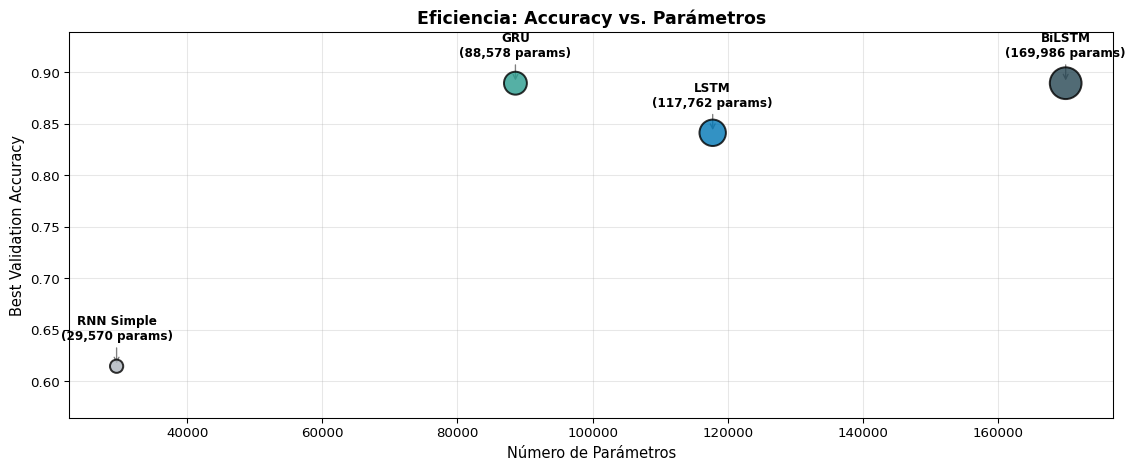
Hallazgos Típicos

  • GRU logra rendimiento similar a LSTM con ~25% menos parámetros
  • BiLSTM generalmente obtiene el mejor rendimiento, pero al mayor costo
  • RNN simple se queda atrás, especialmente con secuencias largas
  • El beneficio de bidireccionalidad depende de la tarea

Resumen

Lo Que Aprendimos Hoy

Conceptos

  • GRU: 2 compuertas (\(r_t\), \(z_t\)), 1 estado
  • Actualización por interpolación: \(h_t = (1-z_t)h_{t-1} + z_t\tilde{h}_t\)
  • GRU ≈ LSTM con menos parámetros
  • BiRNN: procesa en ambas direcciones
  • Salida bidireccional: \(h_t = [\overrightarrow{h_t};\overleftarrow{h_t}]\)

Práctica

  • nn.GRU — misma interfaz que nn.RNN
  • bidirectional=True para cualquier RNN/LSTM/GRU
  • Salida bidireccional: dim = 2 × hidden_size
  • h_n[0] = forward, h_n[1] = backward
  • BiLSTM es la opción más popular para tareas de codificación

Ecuaciones Clave de la GRU

Componente Ecuación
Reset \(r_t = \sigma(W_r [h_{t-1}, x_t] + b_r)\)
Actualización \(z_t = \sigma(W_z [h_{t-1}, x_t] + b_z)\)
Candidato \(\tilde{h}_t = \tanh(W_h [r_t \odot h_{t-1}, x_t] + b_h)\)
Estado \(h_t = (1 - z_t) \odot h_{t-1} + z_t \odot \tilde{h}_t\)
Parámetros \(3 \times D_h(d + D_h + 1)\) — 75% de LSTM

Tabla Resumen: Todas las Variantes

Modelo Compuertas Estados Parámetros Memoria Bidireccional
RNN 0 \(h_t\) \(D_h(d+D_h+1)\) Corta Posible
GRU 2 (\(r, z\)) \(h_t\) \(3 \times\) RNN Larga Posible
LSTM 3 (\(f, i, o\)) \(h_t, c_t\) \(4 \times\) RNN Larga Posible
BiRNN \(2 \times\) base \(2 \times\) base \(2 \times\) base Corta
BiGRU \(2 \times 2\) \(2 \times h_t\) \(2 \times\) GRU Larga
BiLSTM \(2 \times 3\) \(2 \times (h_t, c_t)\) \(2 \times\) LSTM Larga

Para la Próxima Semana 📚

Semana 7: Secuencia a Secuencia (Seq2Seq)

  • S1: Arquitecturas Codificador-Decodificador
  • S2: Traducción Automática Neuronal (NMT)
  • S3: El problema del “cuello de botella” y el nacimiento de la Atención

Lectura:

  • Sutskever et al. (2014): Sequence to Sequence Learning with Neural Networks
  • Jurafsky & Martin, Cap. 10: Encoder-Decoder Models
  • Cho et al. (2014): Learning Phrase Representations using RNN Encoder-Decoder

Recordatorio:

  • Quiz 5 esta semana cubre RNNs, LSTM y GRU 🧮

¿Preguntas? 🙋

¡Gracias!

📧 fsuarez@ucb.edu.bo

🔗 Materiales: github.com/fjsuarez/ucb-nlp