Redes Neuronales Recurrentes (RNNs)

S1: Arquitectura RNN — Manejando Longitud Variable

Prof. Francisco Suárez

Universidad Católica Boliviana

2026-03-14

Agenda de Hoy

Primera Parte

  1. 🔙 Repaso: ¿Por qué los MLPs no bastan?
  2. 🔄 La idea recurrente: compartir pesos en el tiempo
  3. 📐 Arquitectura RNN: ecuaciones y flujo

Segunda Parte

  1. 🐍 RNNs en PyTorch: nn.RNN y nn.Embedding
  2. 🏷️ Aplicaciones: clasificación y etiquetado
  3. ⚠️ Limitaciones: la memoria a corto plazo

Bloque 1: El Problema con las Redes Feedforward

MLPs y Texto: ¿Qué Falta?

En la Semana 5, clasificamos texto con MLPs usando TF-IDF:

\[\text{documento} \xrightarrow{\text{TF-IDF}} \mathbf{x} \in \mathbb{R}^{|V|} \xrightarrow{\text{MLP}} \hat{y}\]

Lo que funcionaba

  • Clasificación de documentos completos
  • Vectores de tamaño fijo como entrada
  • Captura frecuencia de palabras

Lo que se pierde

  • Orden de las palabras: “el perro mordió al hombre” ≠ “el hombre mordió al perro”
  • Longitud variable: las oraciones tienen distinto largo
  • Dependencias secuenciales: el significado depende del contexto previo

El Problema Fundamental

Un MLP con TF-IDF trata el texto como una bolsa de palabras — pierde completamente la estructura secuencial del lenguaje.

Ejemplos: El Orden Importa

Oración BoW/TF-IDF Significado
“No es bueno, es malo {no, es, bueno, malo} Negativo
“No es malo, es bueno {no, es, bueno, malo} Positivo
“Juan le pagó a María” {Juan, pagó, María} Juan → María
“María le pagó a Juan” {Juan, pagó, María} María → Juan

Mismos vectores BoW → misma predicción del MLP. Necesitamos modelos que entiendan la secuencia.

Otros problemas de longitud variable:

  • Traducción: “hola” (1 token) → “hello” (1 token), pero “¿cómo estás?” (2-3 tokens) → “how are you?” (3 tokens)
  • Generación: No sabemos de antemano cuántos tokens producir
  • Etiquetado POS: Cada palabra necesita su propia etiqueta

¿Qué Necesitamos?

Un modelo que pueda:

  1. Procesar secuencias de longitud arbitraria
  2. Recordar información de pasos anteriores
  3. Compartir parámetros entre posiciones (no un peso diferente por posición)
  4. Producir salidas de longitud variable
Code
graph LR
    subgraph "MLP: entrada fija"
        x1["x (fijo)"] --> mlp["MLP"] --> y1["y (fijo)"]
    end
    subgraph "RNN: secuencia variable"
        w1["w₁"] --> rnn1["RNN"]
        w2["w₂"] --> rnn2["RNN"]
        w3["w₃"] --> rnn3["RNN"]
        wn["..."] --> rnnn["RNN"]
        rnn1 -->|"h₁"| rnn2
        rnn2 -->|"h₂"| rnn3
        rnn3 -->|"h₃"| rnnn
    end
    style mlp fill:#e76f51,color:#fff
    style rnn1 fill:#2a9d8f,color:#fff
    style rnn2 fill:#2a9d8f,color:#fff
    style rnn3 fill:#2a9d8f,color:#fff
    style rnnn fill:#2a9d8f,color:#fff

graph LR
    subgraph "MLP: entrada fija"
        x1["x (fijo)"] --> mlp["MLP"] --> y1["y (fijo)"]
    end
    subgraph "RNN: secuencia variable"
        w1["w₁"] --> rnn1["RNN"]
        w2["w₂"] --> rnn2["RNN"]
        w3["w₃"] --> rnn3["RNN"]
        wn["..."] --> rnnn["RNN"]
        rnn1 -->|"h₁"| rnn2
        rnn2 -->|"h₂"| rnn3
        rnn3 -->|"h₃"| rnnn
    end
    style mlp fill:#e76f51,color:#fff
    style rnn1 fill:#2a9d8f,color:#fff
    style rnn2 fill:#2a9d8f,color:#fff
    style rnn3 fill:#2a9d8f,color:#fff
    style rnnn fill:#2a9d8f,color:#fff

La clave: los mismos pesos se aplican en cada paso temporal.

Bloque 2: La Arquitectura RNN

La Idea Clave: Recurrencia

Una Red Neuronal Recurrente mantiene un estado oculto \(h_t\) que se actualiza en cada paso temporal:

\[h_t = f(h_{t-1}, x_t)\]

Vista compacta (un solo bloque)

Code
graph TD
    x["x_t"] --> rnn["RNN Cell"]
    h_prev["h_{t-1}"] --> rnn
    rnn --> h_next["h_t"]
    rnn --> y["y_t"]
    h_next -.->|"recurrencia"| h_prev
    style rnn fill:#2a9d8f,color:#fff

graph TD
    x["x_t"] --> rnn["RNN Cell"]
    h_prev["h_{t-1}"] --> rnn
    rnn --> h_next["h_t"]
    rnn --> y["y_t"]
    h_next -.->|"recurrencia"| h_prev
    style rnn fill:#2a9d8f,color:#fff

Vista desenrollada (a lo largo del tiempo)

Code
graph LR
    x1["x₁"] --> r1["RNN"]
    x2["x₂"] --> r2["RNN"]
    x3["x₃"] --> r3["RNN"]
    x4["x₄"] --> r4["RNN"]
    h0["h₀"] --> r1
    r1 -->|"h₁"| r2
    r2 -->|"h₂"| r3
    r3 -->|"h₃"| r4
    r4 --> h4["h₄"]
    r1 --> y1["y₁"]
    r2 --> y2["y₂"]
    r3 --> y3["y₃"]
    r4 --> y4["y₄"]
    style r1 fill:#2a9d8f,color:#fff
    style r2 fill:#2a9d8f,color:#fff
    style r3 fill:#2a9d8f,color:#fff
    style r4 fill:#2a9d8f,color:#fff

graph LR
    x1["x₁"] --> r1["RNN"]
    x2["x₂"] --> r2["RNN"]
    x3["x₃"] --> r3["RNN"]
    x4["x₄"] --> r4["RNN"]
    h0["h₀"] --> r1
    r1 -->|"h₁"| r2
    r2 -->|"h₂"| r3
    r3 -->|"h₃"| r4
    r4 --> h4["h₄"]
    r1 --> y1["y₁"]
    r2 --> y2["y₂"]
    r3 --> y3["y₃"]
    r4 --> y4["y₄"]
    style r1 fill:#2a9d8f,color:#fff
    style r2 fill:#2a9d8f,color:#fff
    style r3 fill:#2a9d8f,color:#fff
    style r4 fill:#2a9d8f,color:#fff

Los 4 bloques comparten exactamente los mismos pesos.

Ecuaciones de la RNN Simple (Elman)

La RNN más básica (Elman, 1990) usa tres matrices de pesos:

\[h_t = \tanh(W_{xh} \cdot x_t + W_{hh} \cdot h_{t-1} + b_h)\] \[y_t = W_{hy} \cdot h_t + b_y\]

Parámetros

Símbolo Dimensión Descripción
\(x_t\) \(d\) Entrada en tiempo \(t\)
\(h_t\) \(D_h\) Estado oculto en tiempo \(t\)
\(W_{xh}\) \(D_h \times d\) Pesos entrada→oculto
\(W_{hh}\) \(D_h \times D_h\) Pesos oculto→oculto
\(W_{hy}\) \(|V| \times D_h\) Pesos oculto→salida

Observaciones

  • \(W_{xh}\) transforma la entrada actual
  • \(W_{hh}\) transforma la “memoria” previa
  • \(\tanh\) limita \(h_t\) a \([-1, 1]\)
  • \(h_0\) se inicializa usualmente como cero
  • Los mismos \(W_{xh}, W_{hh}, W_{hy}\) para todos los pasos

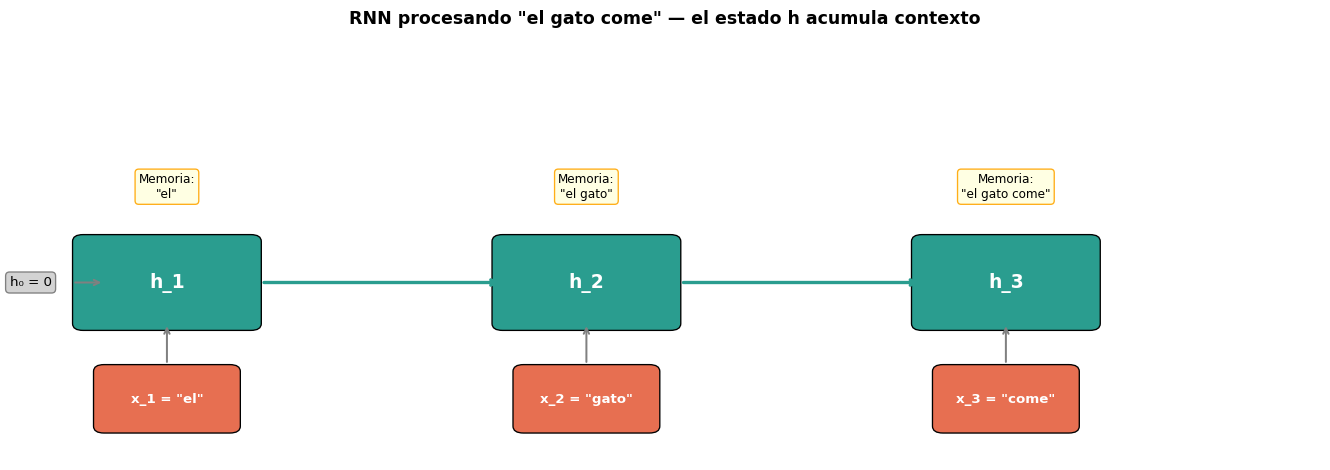
Paso a Paso: Procesando “el gato come”

Code
import numpy as np
import matplotlib.pyplot as plt
import matplotlib.patches as mpatches

fig, ax = plt.subplots(figsize=(14, 5))
ax.set_xlim(-0.5, 12)
ax.set_ylim(-1, 5)
ax.axis('off')

# Colors
c_input = '#e76f51'
c_hidden = '#2a9d8f'
c_output = '#264653'

words = ['el', 'gato', 'come']
descriptions = [
    'h₁ = tanh(W_xh·x₁ + W_hh·h₀ + b)\n= tanh(W_xh·emb("el") + 0)',
    'h₂ = tanh(W_xh·x₂ + W_hh·h₁ + b)\n= tanh(W_xh·emb("gato") + W_hh·h₁)',
    'h₃ = tanh(W_xh·x₃ + W_hh·h₂ + b)\n= tanh(W_xh·emb("come") + W_hh·h₂)',
]
memory_desc = [
    '"el"',
    '"el gato"',
    '"el gato come"',
]

for i, (word, desc, mem) in enumerate(zip(words, descriptions, memory_desc)):
    x_pos = i * 4 + 1

    # Input box
    rect = mpatches.FancyBboxPatch((x_pos - 0.6, -0.5), 1.2, 0.8, 
                                     boxstyle="round,pad=0.1", facecolor=c_input, edgecolor='black')
    ax.add_patch(rect)
    ax.text(x_pos, -0.1, f'x_{i+1} = "{word}"', ha='center', va='center', fontsize=10, color='white', fontweight='bold')

    # Arrow up
    ax.annotate('', xy=(x_pos, 1.0), xytext=(x_pos, 0.4),
                arrowprops=dict(arrowstyle='->', color='gray', lw=1.5))

    # Hidden state box
    rect = mpatches.FancyBboxPatch((x_pos - 0.8, 1.0), 1.6, 1.2,
                                     boxstyle="round,pad=0.1", facecolor=c_hidden, edgecolor='black')
    ax.add_patch(rect)
    ax.text(x_pos, 1.6, f'h_{i+1}', ha='center', va='center', fontsize=14, color='white', fontweight='bold')

    # Memory annotation
    ax.text(x_pos, 3.0, f'Memoria:\n{mem}', ha='center', va='center', fontsize=9,
            bbox=dict(boxstyle='round', facecolor='lightyellow', edgecolor='orange', alpha=0.9))

    # Horizontal arrow (recurrence)
    if i < 2:
        ax.annotate('', xy=(x_pos + 3.2, 1.6), xytext=(x_pos + 0.9, 1.6),
                    arrowprops=dict(arrowstyle='->', color=c_hidden, lw=2.5))

# h0
ax.text(-0.3, 1.6, 'h₀ = 0', ha='center', va='center', fontsize=10,
        bbox=dict(boxstyle='round', facecolor='lightgray', edgecolor='gray'))
ax.annotate('', xy=(0.4, 1.6), xytext=(0.1, 1.6),
            arrowprops=dict(arrowstyle='->', color='gray', lw=1.5))

ax.set_title('RNN procesando "el gato come" — el estado h acumula contexto', 
             fontsize=13, fontweight='bold', pad=20)
plt.tight_layout()
plt.show()

Lo Fundamental

El estado oculto \(h_t\) actúa como una memoria comprimida de todo lo que la red ha visto hasta el paso \(t\). Al procesar “come”, \(h_3\) contiene información tanto de “el” como de “gato”.

¿Cuántos Parámetros Tiene una RNN?

Comparemos con un MLP equivalente para secuencias de longitud máxima \(T\):

MLP (una capa por posición)

  • Pesos: \(T \times (d \times D_h)\)
  • Crece linealmente con la longitud
  • No generaliza a longitudes no vistas
  • Ejemplo: \(T=100, d=300, D_h=256\)
    • → 7,680,000 parámetros

RNN (pesos compartidos)

  • Pesos: \(d \times D_h + D_h \times D_h + D_h\)
  • Constante sin importar la longitud
  • Generaliza a cualquier \(T\)
  • Ejemplo: \(d=300, D_h=256\)
    • → 142,592 parámetros

Compartir Pesos = Inductive Bias

Al usar los mismos pesos en cada paso, la RNN asume que las mismas reglas de transformación aplican sin importar la posición. Esto es como asumir invarianza temporal — similar a cómo las CNNs asumen invarianza espacial.

Bloque 3: Embeddings y Entrada a la RNN

De Palabras a Vectores: nn.Embedding

Las RNNs no reciben texto directamente — necesitan vectores. Usamos una capa de embedding:

\[x_t = \text{Embedding}(w_t) \in \mathbb{R}^d\]

import torch
import torch.nn as nn

# Vocabulario de ejemplo
vocab = {'<pad>': 0, 'el': 1, 'gato': 2, 'come': 3, 'pescado': 4, 'perro': 5, 'duerme': 6}
vocab_size = len(vocab)
embed_dim = 8  # dimensión del embedding

# Capa de embedding
embedding = nn.Embedding(num_embeddings=vocab_size, embedding_dim=embed_dim, padding_idx=0)

# Convertir oración a índices
sentence = ['el', 'gato', 'come', 'pescado']
indices = torch.tensor([vocab[w] for w in sentence])

# Obtener embeddings
vectors = embedding(indices)
print(f"Índices: {indices}")
print(f"Forma de embeddings: {vectors.shape}  →  (seq_len={len(sentence)}, embed_dim={embed_dim})")
print(f"\nEmbedding de 'gato': {vectors[1].data.round(decimals=3)}")
Índices: tensor([1, 2, 3, 4])
Forma de embeddings: torch.Size([4, 8])  →  (seq_len=4, embed_dim=8)

Embedding de 'gato': tensor([ 0.5100,  0.1480,  0.1320,  0.5010, -0.9860,  1.6430,  0.4690, -0.9210])

Embedding vs. One-Hot

One-hot: vector sparse de tamaño \(|V|\) (ej: 50,000). Embedding: vector denso de tamaño \(d\) (ej: 300). Los embeddings se aprenden durante el entrenamiento o se usan pre-entrenados (Word2Vec, GloVe).

Manejo de Longitud Variable: Padding

Las oraciones tienen diferente largo, pero los tensores necesitan forma rectangular.

# Batch de oraciones de diferente largo
sentences = [
    ['el', 'gato', 'come', 'pescado'],  # 4 tokens
    ['el', 'perro', 'duerme'],            # 3 tokens
]

# Convertir a índices y hacer padding
def to_indices(sent, vocab, max_len):
    ids = [vocab[w] for w in sent]
    ids += [vocab['<pad>']] * (max_len - len(ids))  # Rellenar con 0
    return ids

max_len = max(len(s) for s in sentences)
batch = torch.tensor([to_indices(s, vocab, max_len) for s in sentences])
lengths = torch.tensor([len(s) for s in sentences])

print(f"Batch (con padding):\n{batch}")
print(f"Longitudes reales: {lengths}")
print(f"Forma: {batch.shape}  →  (batch_size={len(sentences)}, max_len={max_len})")
Batch (con padding):
tensor([[1, 2, 3, 4],
        [1, 5, 6, 0]])
Longitudes reales: tensor([4, 3])
Forma: torch.Size([2, 4])  →  (batch_size=2, max_len=4)
# Embeddings del batch completo
batch_embeddings = embedding(batch)
print(f"Forma de embeddings: {batch_embeddings.shape}  →  (batch, max_len, embed_dim)")
Forma de embeddings: torch.Size([2, 4, 8])  →  (batch, max_len, embed_dim)

Empaquetando Secuencias: pack_padded_sequence

El padding desperdicia cómputo. PyTorch ofrece packed sequences para que la RNN ignore los tokens <pad>:

from torch.nn.utils.rnn import pack_padded_sequence, pad_packed_sequence

# 1. Ordenar por longitud (descendente) — requerido por pack_padded_sequence
sorted_lengths, sort_idx = lengths.sort(descending=True)
sorted_batch = batch_embeddings[sort_idx]

# 2. Empaquetar
packed = pack_padded_sequence(sorted_batch, sorted_lengths.cpu(), batch_first=True)
print(f"Datos empaquetados: {packed.data.shape}")
print(f"Longitudes del batch: {packed.batch_sizes}")

# 3. Pasar por RNN
rnn = nn.RNN(input_size=embed_dim, hidden_size=16, batch_first=True)
packed_output, h_n = rnn(packed)

# 4. Desempaquetar
output, output_lengths = pad_packed_sequence(packed_output, batch_first=True)
print(f"\nSalida desempaquetada: {output.shape}  →  (batch, max_len, hidden)")
print(f"Estado final h_n: {h_n.shape}  →  (num_layers, batch, hidden)")
Datos empaquetados: torch.Size([7, 8])
Longitudes del batch: tensor([2, 2, 2, 1])

Salida desempaquetada: torch.Size([2, 4, 16])  →  (batch, max_len, hidden)
Estado final h_n: torch.Size([1, 2, 16])  →  (num_layers, batch, hidden)

Bloque 4: RNNs en PyTorch

nn.RNN Paso a Paso

import torch
import torch.nn as nn

# Definir una RNN simple
rnn = nn.RNN(
    input_size=8,       # dimensión de entrada (embedding_dim)
    hidden_size=16,     # dimensión del estado oculto
    num_layers=1,       # capas apiladas
    batch_first=True,   # entrada: (batch, seq_len, input_size)
    nonlinearity='tanh' # función de activación
)

# Entrada: batch de 2 secuencias de longitud 5
x = torch.randn(2, 5, 8)  # (batch=2, seq_len=5, input_size=8)
h0 = torch.zeros(1, 2, 16) # (num_layers=1, batch=2, hidden=16)

# Forward pass
output, h_n = rnn(x, h0)

print(f"Entrada:         {x.shape}      →  (batch, seq_len, input)")
print(f"h₀ inicial:      {h0.shape}     →  (layers, batch, hidden)")
print(f"Salida (todos):   {output.shape}  →  (batch, seq_len, hidden)")
print(f"h_n (último):     {h_n.shape}     →  (layers, batch, hidden)")
print(f"\n¿output[:,-1,:] == h_n[0]?  {torch.allclose(output[:, -1, :], h_n[0])}")
Entrada:         torch.Size([2, 5, 8])      →  (batch, seq_len, input)
h₀ inicial:      torch.Size([1, 2, 16])     →  (layers, batch, hidden)
Salida (todos):   torch.Size([2, 5, 16])  →  (batch, seq_len, hidden)
h_n (último):     torch.Size([1, 2, 16])     →  (layers, batch, hidden)

¿output[:,-1,:] == h_n[0]?  True

output vs. h_n

  • output: estados ocultos de todos los pasos temporales → útil para etiquetado (una salida por token)
  • h_n: estado oculto del último paso → útil para clasificación (una salida por secuencia)

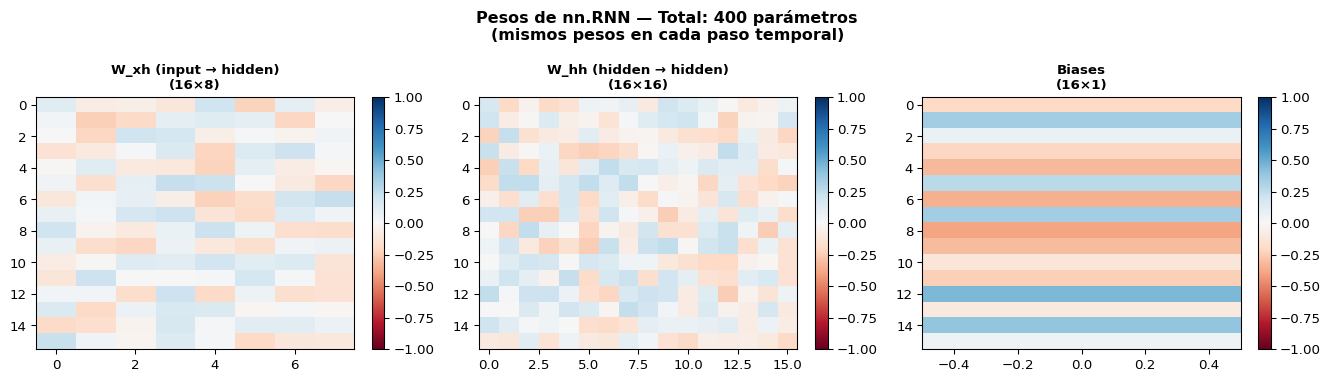
Visualizando los Pesos de la RNN

Code
import matplotlib.pyplot as plt

fig, axes = plt.subplots(1, 3, figsize=(14, 4))

# Extraer pesos
W_ih = rnn.weight_ih_l0.data.numpy()  # W_xh: input → hidden
W_hh = rnn.weight_hh_l0.data.numpy()  # W_hh: hidden → hidden
b = rnn.bias_ih_l0.data.numpy() + rnn.bias_hh_l0.data.numpy()

for ax, w, title, dims in [
    (axes[0], W_ih, 'W_xh (input → hidden)', f'{W_ih.shape[0]}×{W_ih.shape[1]}'),
    (axes[1], W_hh, 'W_hh (hidden → hidden)', f'{W_hh.shape[0]}×{W_hh.shape[1]}'),
    (axes[2], b.reshape(-1, 1), 'Biases', f'{len(b)}×1'),
]:
    im = ax.imshow(w, cmap='RdBu', aspect='auto', vmin=-1, vmax=1)
    ax.set_title(f'{title}\n({dims})', fontsize=10, fontweight='bold')
    plt.colorbar(im, ax=ax, fraction=0.046)

total = W_ih.size + W_hh.size + b.size
plt.suptitle(f'Pesos de nn.RNN — Total: {total} parámetros\n(mismos pesos en cada paso temporal)',
             fontsize=12, fontweight='bold')
plt.tight_layout()
plt.show()

RNN de Múltiples Capas (Stacked RNN)

Se pueden apilar RNNs: la salida de una capa es la entrada de la siguiente.

Code
graph LR
    subgraph "Capa 1"
        x1["x₁"] --> r11["RNN L1"]
        x2["x₂"] --> r12["RNN L1"]
        x3["x₃"] --> r13["RNN L1"]
        r11 -->|"h¹₁"| r12
        r12 -->|"h¹₂"| r13
    end
    subgraph "Capa 2"
        r11 -->|"h¹₁"| r21["RNN L2"]
        r12 -->|"h¹₂"| r22["RNN L2"]
        r13 -->|"h¹₃"| r23["RNN L2"]
        r21 -->|"h²₁"| r22
        r22 -->|"h²₂"| r23
    end
    r21 --> y1["y₁"]
    r22 --> y2["y₂"]
    r23 --> y3["y₃"]
    style r11 fill:#2a9d8f,color:#fff
    style r12 fill:#2a9d8f,color:#fff
    style r13 fill:#2a9d8f,color:#fff
    style r21 fill:#264653,color:#fff
    style r22 fill:#264653,color:#fff
    style r23 fill:#264653,color:#fff

graph LR
    subgraph "Capa 1"
        x1["x₁"] --> r11["RNN L1"]
        x2["x₂"] --> r12["RNN L1"]
        x3["x₃"] --> r13["RNN L1"]
        r11 -->|"h¹₁"| r12
        r12 -->|"h¹₂"| r13
    end
    subgraph "Capa 2"
        r11 -->|"h¹₁"| r21["RNN L2"]
        r12 -->|"h¹₂"| r22["RNN L2"]
        r13 -->|"h¹₃"| r23["RNN L2"]
        r21 -->|"h²₁"| r22
        r22 -->|"h²₂"| r23
    end
    r21 --> y1["y₁"]
    r22 --> y2["y₂"]
    r23 --> y3["y₃"]
    style r11 fill:#2a9d8f,color:#fff
    style r12 fill:#2a9d8f,color:#fff
    style r13 fill:#2a9d8f,color:#fff
    style r21 fill:#264653,color:#fff
    style r22 fill:#264653,color:#fff
    style r23 fill:#264653,color:#fff

# RNN con 2 capas
rnn_stacked = nn.RNN(input_size=8, hidden_size=16, num_layers=2, batch_first=True)

x = torch.randn(2, 5, 8)
output, h_n = rnn_stacked(x)

print(f"Salida: {output.shape}    →  salida de la ÚLTIMA capa solamente")
print(f"h_n:    {h_n.shape}  →  h final de CADA capa (2 capas × 2 batches × 16 hidden)")
Salida: torch.Size([2, 5, 16])    →  salida de la ÚLTIMA capa solamente
h_n:    torch.Size([2, 2, 16])  →  h final de CADA capa (2 capas × 2 batches × 16 hidden)

Bloque 5: Aplicaciones de RNNs

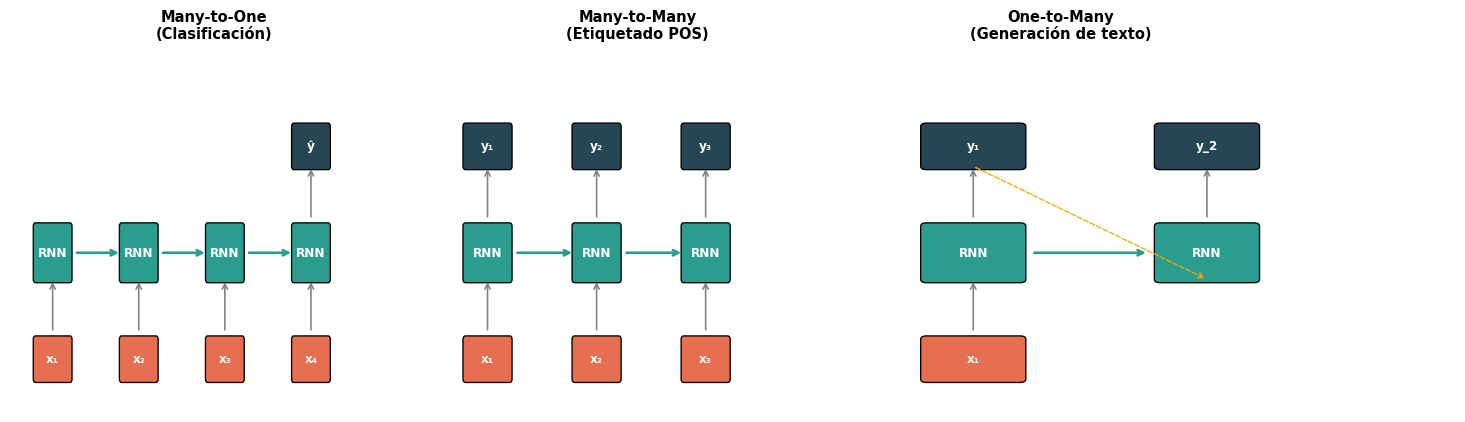
Patrones de Uso de RNNs

Code
import matplotlib.pyplot as plt
import matplotlib.patches as mpatches

fig, axes = plt.subplots(1, 3, figsize=(15, 4.5))

def draw_rnn_pattern(ax, title, inputs, outputs, connections, subtitle=""):
    ax.set_xlim(-0.5, max(len(inputs), len(outputs)) * 2 + 1)
    ax.set_ylim(-1.5, 4)
    ax.axis('off')
    ax.set_title(f'{title}\n{subtitle}', fontsize=11, fontweight='bold')

    c_in = '#e76f51'
    c_rnn = '#2a9d8f'
    c_out = '#264653'

    # Draw RNN cells
    for i, inp in enumerate(inputs):
        x = i * 2 + 0.5
        # Input
        rect = mpatches.FancyBboxPatch((x - 0.4, -1.0), 0.8, 0.6,
                                         boxstyle="round,pad=0.05", facecolor=c_in, edgecolor='black')
        ax.add_patch(rect)
        ax.text(x, -0.7, inp, ha='center', va='center', fontsize=9, color='white', fontweight='bold')

        # RNN cell
        rect = mpatches.FancyBboxPatch((x - 0.4, 0.5), 0.8, 0.8,
                                         boxstyle="round,pad=0.05", facecolor=c_rnn, edgecolor='black')
        ax.add_patch(rect)
        ax.text(x, 0.9, 'RNN', ha='center', va='center', fontsize=9, color='white', fontweight='bold')

        # Arrow in→rnn
        ax.annotate('', xy=(x, 0.5), xytext=(x, -0.3),
                    arrowprops=dict(arrowstyle='->', color='gray', lw=1.2))

        # Horizontal recurrence
        if i < len(inputs) - 1:
            ax.annotate('', xy=(x + 1.6, 0.9), xytext=(x + 0.5, 0.9),
                        arrowprops=dict(arrowstyle='->', color=c_rnn, lw=2))

    # Draw outputs
    for pos, label in outputs:
        x = pos * 2 + 0.5
        rect = mpatches.FancyBboxPatch((x - 0.4, 2.2), 0.8, 0.6,
                                         boxstyle="round,pad=0.05", facecolor=c_out, edgecolor='black')
        ax.add_patch(rect)
        ax.text(x, 2.5, label, ha='center', va='center', fontsize=9, color='white', fontweight='bold')
        ax.annotate('', xy=(x, 2.2), xytext=(x, 1.4),
                    arrowprops=dict(arrowstyle='->', color='gray', lw=1.2))

# Many-to-One (clasificación)
draw_rnn_pattern(axes[0], 'Many-to-One',
                 ['x₁', 'x₂', 'x₃', 'x₄'],
                 [(3, 'ŷ')], [],
                 '(Clasificación)')

# Many-to-Many (etiquetado)
draw_rnn_pattern(axes[1], 'Many-to-Many',
                 ['x₁', 'x₂', 'x₃'],
                 [(0, 'y₁'), (1, 'y₂'), (2, 'y₃')], [],
                 '(Etiquetado POS)')

# One-to-Many (generación)
draw_rnn_pattern(axes[2], 'One-to-Many',
                 ['x₁'],
                 [(0, 'y₁')], [],
                 '(Generación de texto)')
# Manually add generated tokens
c_out = '#264653'
for i in range(1, 3):
    x = i * 2 + 0.5
    rect = mpatches.FancyBboxPatch((x - 0.4, 0.5), 0.8, 0.8,
                                     boxstyle="round,pad=0.05", facecolor='#2a9d8f', edgecolor='black')
    axes[2].add_patch(rect)
    axes[2].text(x, 0.9, 'RNN', ha='center', va='center', fontsize=9, color='white', fontweight='bold')
    rect_o = mpatches.FancyBboxPatch((x - 0.4, 2.2), 0.8, 0.6,
                                      boxstyle="round,pad=0.05", facecolor=c_out, edgecolor='black')
    axes[2].add_patch(rect_o)
    axes[2].text(x, 2.5, f'y_{i+1}', ha='center', va='center', fontsize=9, color='white', fontweight='bold')
    axes[2].annotate('', xy=(x, 2.2), xytext=(x, 1.4),
                arrowprops=dict(arrowstyle='->', color='gray', lw=1.2))
    axes[2].annotate('', xy=(x - 0.5, 0.9), xytext=(x - 1.5, 0.9),
                arrowprops=dict(arrowstyle='->', color='#2a9d8f', lw=2))
    # Feedback arrow
    axes[2].annotate('', xy=(x, 0.5), xytext=(x - 2, 2.2),
                arrowprops=dict(arrowstyle='->', color='orange', lw=1, linestyle='dashed'))

plt.tight_layout()
plt.show()

Ejemplo: Clasificador de Sentimiento con RNN

import torch
import torch.nn as nn

class RNNClassifier(nn.Module):
    """Clasificador Many-to-One: usa el último h como representación."""
    def __init__(self, vocab_size, embed_dim, hidden_dim, n_classes, padding_idx=0):
        super().__init__()
        self.embedding = nn.Embedding(vocab_size, embed_dim, padding_idx=padding_idx)
        self.rnn = nn.RNN(embed_dim, hidden_dim, batch_first=True)
        self.fc = nn.Linear(hidden_dim, n_classes)
        self.dropout = nn.Dropout(0.3)

    def forward(self, x):
        # x: (batch, seq_len) — índices de palabras
        emb = self.embedding(x)           # (batch, seq_len, embed_dim)
        output, h_n = self.rnn(emb)       # h_n: (1, batch, hidden_dim)
        h_last = h_n.squeeze(0)           # (batch, hidden_dim)
        h_last = self.dropout(h_last)
        logits = self.fc(h_last)          # (batch, n_classes)
        return logits

# Instanciar
model = RNNClassifier(vocab_size=10000, embed_dim=100, hidden_dim=128, n_classes=2)
print(model)
print(f"\nParámetros totales: {sum(p.numel() for p in model.parameters()):,}")
RNNClassifier(
  (embedding): Embedding(10000, 100, padding_idx=0)
  (rnn): RNN(100, 128, batch_first=True)
  (fc): Linear(in_features=128, out_features=2, bias=True)
  (dropout): Dropout(p=0.3, inplace=False)
)

Parámetros totales: 1,029,698

Ejemplo: Etiquetador POS con RNN

class RNNTagger(nn.Module):
    """Etiquetador Many-to-Many: una etiqueta por cada token."""
    def __init__(self, vocab_size, embed_dim, hidden_dim, tagset_size, padding_idx=0):
        super().__init__()
        self.embedding = nn.Embedding(vocab_size, embed_dim, padding_idx=padding_idx)
        self.rnn = nn.RNN(embed_dim, hidden_dim, batch_first=True)
        self.fc = nn.Linear(hidden_dim, tagset_size)

    def forward(self, x):
        emb = self.embedding(x)           # (batch, seq_len, embed_dim)
        output, _ = self.rnn(emb)         # output: (batch, seq_len, hidden_dim)
        logits = self.fc(output)          # (batch, seq_len, tagset_size)
        return logits

# Tags comunes de POS
tags = ['<pad>', 'DET', 'NOUN', 'VERB', 'ADJ', 'ADP', 'ADV', 'PRON', 'PUNCT']
tagger = RNNTagger(vocab_size=10000, embed_dim=100, hidden_dim=128, tagset_size=len(tags))

# Prueba con un mini-batch
x_test = torch.tensor([[1, 54, 203, 12]])  # "el gato come pescado" (ids ficticios)
logits = tagger(x_test)
preds = logits.argmax(dim=-1)
print(f"Entrada:     {x_test.shape}")
print(f"Logits:      {logits.shape}   →  (batch, seq_len, n_tags)")
print(f"Predicción:  {[tags[i] for i in preds[0].tolist()]}")
Entrada:     torch.Size([1, 4])
Logits:      torch.Size([1, 4, 9])   →  (batch, seq_len, n_tags)
Predicción:  ['NOUN', 'ADP', 'DET', 'ADV']

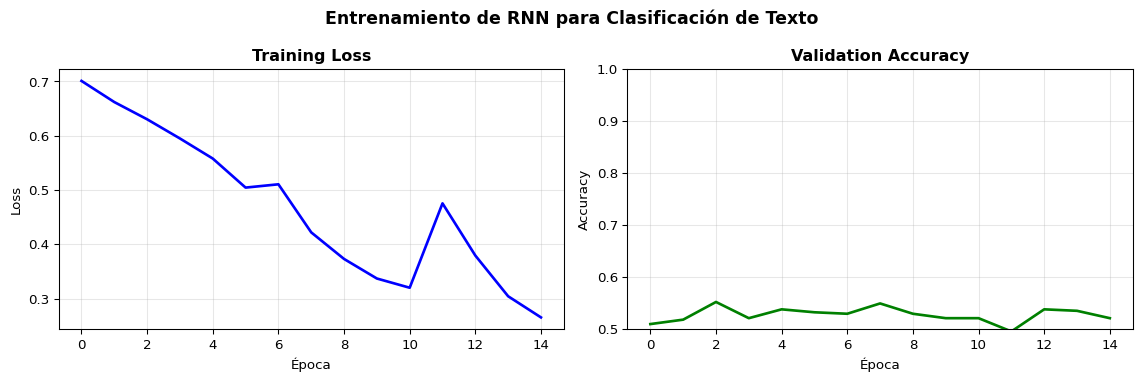
Entrenamiento Completo: Clasificación con RNN

Code
import torch
import torch.nn as nn
import numpy as np
from sklearn.datasets import fetch_20newsgroups
from collections import Counter

# 1. Datos: 2 categorías (sentimiento simulado)
categories = ['sci.space', 'talk.politics.misc']
data = fetch_20newsgroups(subset='all', categories=categories, remove=('headers', 'footers'))
texts, labels = data.data, data.target

# 2. Tokenización simple + vocabulario
def simple_tokenize(text, max_len=100):
    tokens = text.lower().split()[:max_len]
    return tokens

all_tokens = [t for text in texts for t in simple_tokenize(text)]
word_counts = Counter(all_tokens)
vocab_list = ['<pad>', '<unk>'] + [w for w, c in word_counts.most_common(5000)]
word2idx = {w: i for i, w in enumerate(vocab_list)}

def encode(text, max_len=100):
    tokens = simple_tokenize(text, max_len)
    ids = [word2idx.get(t, 1) for t in tokens]  # 1 = <unk>
    ids += [0] * (max_len - len(ids))  # padding
    return ids

# 3. Preparar tensores
from sklearn.model_selection import train_test_split

X = torch.tensor([encode(t) for t in texts])
y = torch.tensor(labels)
X_train, X_val, y_train, y_val = train_test_split(X, y, test_size=0.2, random_state=42)

train_ds = torch.utils.data.TensorDataset(X_train, y_train)
train_loader = torch.utils.data.DataLoader(train_ds, batch_size=32, shuffle=True)

# 4. Modelo, optimizador, entrenamiento
model = RNNClassifier(vocab_size=len(vocab_list), embed_dim=64, hidden_dim=64, n_classes=2)
optimizer = torch.optim.Adam(model.parameters(), lr=0.001)
criterion = nn.CrossEntropyLoss()

train_losses, val_accs = [], []

for epoch in range(15):
    model.train()
    epoch_loss = 0
    for xb, yb in train_loader:
        optimizer.zero_grad()
        logits = model(xb)
        loss = criterion(logits, yb)
        loss.backward()
        torch.nn.utils.clip_grad_norm_(model.parameters(), 1.0)  # Gradient clipping
        optimizer.step()
        epoch_loss += loss.item()

    train_losses.append(epoch_loss / len(train_loader))

    model.eval()
    with torch.no_grad():
        val_logits = model(X_val)
        val_acc = (val_logits.argmax(1) == y_val).float().mean().item()
        val_accs.append(val_acc)

    if (epoch + 1) % 5 == 0:
        print(f"Epoch {epoch+1:2d} | Loss: {train_losses[-1]:.4f} | Val Acc: {val_acc:.4f}")

# Gráficas
fig, axes = plt.subplots(1, 2, figsize=(12, 4))
axes[0].plot(train_losses, 'b-', linewidth=2)
axes[0].set_xlabel('Época')
axes[0].set_ylabel('Loss')
axes[0].set_title('Training Loss', fontweight='bold')
axes[0].grid(True, alpha=0.3)

axes[1].plot(val_accs, 'g-', linewidth=2)
axes[1].set_xlabel('Época')
axes[1].set_ylabel('Accuracy')
axes[1].set_title('Validation Accuracy', fontweight='bold')
axes[1].set_ylim(0.5, 1.0)
axes[1].grid(True, alpha=0.3)

plt.suptitle('Entrenamiento de RNN para Clasificación de Texto', fontsize=13, fontweight='bold')
plt.tight_layout()
plt.show()
Epoch  5 | Loss: 0.5580 | Val Acc: 0.5382
Epoch 10 | Loss: 0.3370 | Val Acc: 0.5212
Epoch 15 | Loss: 0.2654 | Val Acc: 0.5212

Bloque 6: Limitaciones y BPTT

Backpropagation Through Time (BPTT)

Para entrenar una RNN, “desenrollamos” la red y aplicamos backprop a la secuencia completa:

\[\frac{\partial \mathcal{L}}{\partial W_{hh}} = \sum_{t=1}^{T} \frac{\partial \mathcal{L}_t}{\partial W_{hh}} = \sum_{t=1}^{T} \sum_{k=1}^{t} \frac{\partial \mathcal{L}_t}{\partial h_t} \prod_{j=k+1}^{t} \frac{\partial h_j}{\partial h_{j-1}} \frac{\partial h_k}{\partial W_{hh}}\]

El producto clave

\[\prod_{j=k+1}^{t} \frac{\partial h_j}{\partial h_{j-1}} = \prod_{j=k+1}^{t} W_{hh}^T \cdot \text{diag}(1 - h_j^2)\]

Si \(t - k\) es grande (dependencia lejana), este producto tiene muchos factores.

Consecuencias

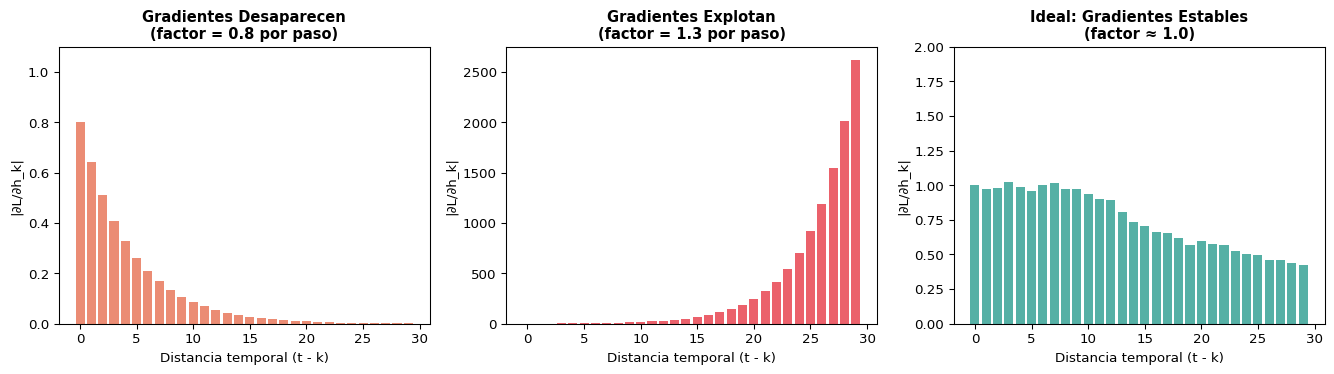
  • Si \(\|W_{hh}\| < 1\): gradientes → 0 (desaparecen)
  • Si \(\|W_{hh}\| > 1\): gradientes → (explotan)
  • Solución para explosión: gradient clipping
# Gradient clipping en PyTorch
torch.nn.utils.clip_grad_norm_(
    model.parameters(), max_norm=1.0
)

El Problema del Gradiente que Desaparece

Code
import numpy as np
import matplotlib.pyplot as plt

# Simular la magnitud del gradiente a través del tiempo
np.random.seed(42)
T = 30

# Caso 1: gradientes que desaparecen (norma espectral < 1)
grad_vanish = []
g = 1.0
for t in range(T):
    g *= 0.8  # factor < 1
    grad_vanish.append(g)

# Caso 2: gradientes que explotan (norma espectral > 1)
grad_explode = []
g = 1.0
for t in range(T):
    g *= 1.3  # factor > 1
    grad_explode.append(g)

# Caso 3: ideal (norma ≈ 1)
grad_ideal = []
g = 1.0
for t in range(T):
    g *= (0.98 + 0.04 * np.random.randn())
    grad_ideal.append(abs(g))

fig, axes = plt.subplots(1, 3, figsize=(14, 4))

axes[0].bar(range(T), grad_vanish, color='#e76f51', alpha=0.8)
axes[0].set_title('Gradientes Desaparecen\n(factor = 0.8 por paso)', fontweight='bold', fontsize=11)
axes[0].set_xlabel('Distancia temporal (t - k)')
axes[0].set_ylabel('|∂L/∂h_k|')
axes[0].set_ylim(0, 1.1)

axes[1].bar(range(T), grad_explode, color='#e63946', alpha=0.8)
axes[1].set_title('Gradientes Explotan\n(factor = 1.3 por paso)', fontweight='bold', fontsize=11)
axes[1].set_xlabel('Distancia temporal (t - k)')
axes[1].set_ylabel('|∂L/∂h_k|')

axes[2].bar(range(T), grad_ideal, color='#2a9d8f', alpha=0.8)
axes[2].set_title('Ideal: Gradientes Estables\n(factor ≈ 1.0)', fontweight='bold', fontsize=11)
axes[2].set_xlabel('Distancia temporal (t - k)')
axes[2].set_ylabel('|∂L/∂h_k|')
axes[2].set_ylim(0, 2)

plt.tight_layout()
plt.show()

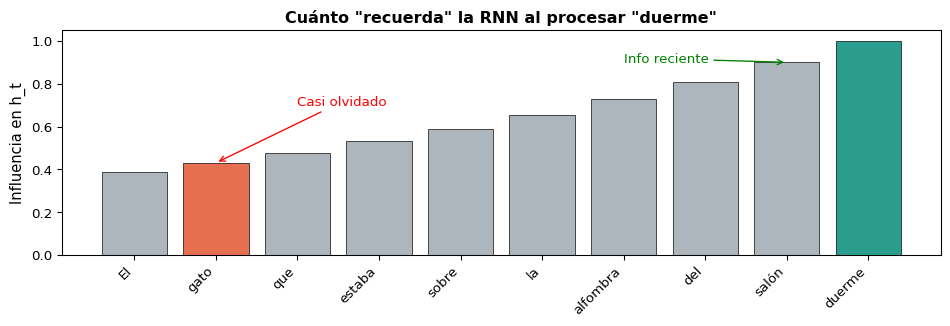
Memoria a Corto Plazo de las RNNs

El problema en NLP

El gato que estaba sobre la alfombra roja del salón que compramos el verano pasado en la tienda del centro duerme.”

¿El verbo “duerme” concuerda con “gato” (20+ tokens atrás)?

La RNN simple no puede conectar estos tokens lejanos porque el gradiente se desvanece durante BPTT.

Lo que la RNN “recuerda”

Code
import matplotlib.pyplot as plt
import numpy as np

words = ['El', 'gato', 'que', 'estaba', 'sobre', 'la', 'alfombra', 'del', 'salón', 'duerme']
n = len(words)
memory = np.array([0.9**i for i in range(n)])[::-1]

fig, ax = plt.subplots(figsize=(10, 3.5))
colors = ['#e76f51' if w in ['gato'] else '#2a9d8f' if w == 'duerme' else '#adb5bd' for w in words]
bars = ax.bar(range(n), memory, color=colors, edgecolor='black', linewidth=0.5)
ax.set_xticks(range(n))
ax.set_xticklabels(words, rotation=45, ha='right', fontsize=10)
ax.set_ylabel('Influencia en h_t', fontsize=11)
ax.set_title('Cuánto "recuerda" la RNN al procesar "duerme"', fontsize=12, fontweight='bold')

ax.annotate('Casi olvidado', xy=(1, memory[1]), xytext=(2, 0.7),
            arrowprops=dict(arrowstyle='->', color='red'), fontsize=10, color='red')
ax.annotate('Info reciente', xy=(8, memory[8]), xytext=(6, 0.9),
            arrowprops=dict(arrowstyle='->', color='green'), fontsize=10, color='green')

plt.tight_layout()
plt.show()

La RNN Simple tiene “Memoria a Corto Plazo”

En la práctica, las RNN simples solo capturan dependencias de ~10-20 tokens. Para dependencias más largas necesitamos arquitecturas especiales: LSTM y GRU (siguiente sesión).

Resumen

Lo Que Aprendimos Hoy

Concepto

  • Los MLPs no capturan orden ni longitud variable
  • Las RNNs procesan secuencias con pesos compartidos
  • El estado oculto \(h_t\) es una memoria comprimida
  • Misma celda aplicada en cada paso temporal

Práctica

  • nn.Embedding convierte palabras a vectores
  • nn.RNN con batch_first=True
  • Padding + pack_padded_sequence para batches
  • Gradient clipping para estabilidad
  • Many-to-One → clasificación
  • Many-to-Many → etiquetado

Ecuaciones Clave

Concepto Fórmula
Estado oculto \(h_t = \tanh(W_{xh} x_t + W_{hh} h_{t-1} + b_h)\)
Salida \(y_t = W_{hy} h_t + b_y\)
Parámetros \(W_{xh} \in \mathbb{R}^{D_h \times d}\), \(W_{hh} \in \mathbb{R}^{D_h \times D_h}\) — compartidos en el tiempo
Embedding \(x_t = \text{Embedding}(w_t) \in \mathbb{R}^d\)
BPTT Gradiente se propaga multiplicando \(W_{hh}^T\) repetidamente → vanishing/exploding

Para la Próxima Sesión 📚

Semana 6, S2: Gradientes que Desaparecen y la Solución LSTM

  • ¿Por qué exactamente se desvanecen los gradientes?
  • Long Short-Term Memory (LSTM): compuertas que controlan el flujo de información
  • La celda de memoria: olvido selectivo y escritura

Lectura:

  • Hochreiter & Schmidhuber (1997): Long Short-Term Memory (paper original)
  • Jurafsky & Martin, Cap. 9.5: LSTMs
  • Olah (2015): Understanding LSTMs (blog post ilustrado)

Recordatorio:

  • Quiz 5 será sobre RNNs y LSTMs (Semana 6 S2) 🧮

¿Preguntas? 🙋

¡Gracias!

📧 fsuarez@ucb.edu.bo

🔗 Materiales: github.com/fjsuarez/ucb-nlp